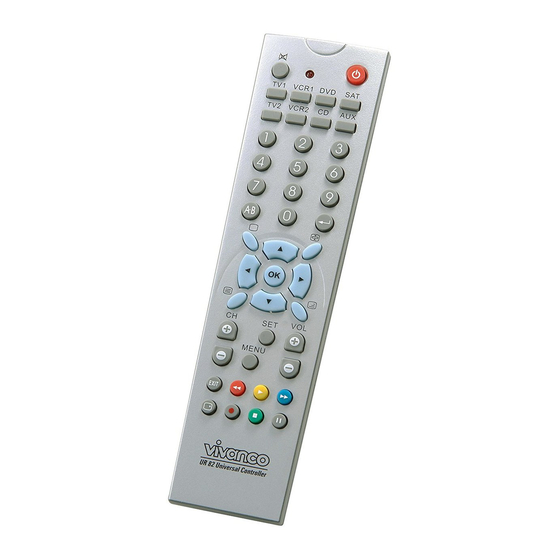
Vivanco UR82 Bedienungsanleitung
Verfügbare Sprachen
Verfügbare Sprachen
Quicklinks
( GB )
Operating Instructions -> 1
( D )
Bedienungsanleitung -> 2
( F )
Notice d'emploi -> 3
( E )
Instrucciones de uso ->4
( I )
Istruzioni per l'uso->6
( NL )
Gebruiksaanwijzing -> 7
( PL )
Instrukcja obsługi -> 8
( P )
Instruções de operação -> 9
(DK)
Betjeningsvejledning -> 11
(S)
Bruksanvisning -> 12
(RUS)
(GR)
->15
Kullanma talimatı -> 16
(TR)
(CZ)
Návod k obsluze -> 17
(SK)
Návod na obsluhu-> 18
(H)
Kezelési utasítása -> 20
(GB) Instructions
Inserting the batteries
Open the battery flap on the back of the
remote control, press the tongue lightly
downwards, then insert 2 alkaline AAA
batteries. Check that the polarity markings on
the batteries and in the battery compartment
are correctly lined up (+=+), then close the flap
carefully. – Always use undamaged batteries.
Adapting to a device (e.g. TV or DVB Set
Top Box (or SAT/Cable) etc.
In order to control e.g. your TV or DVB you
must adapt or set the remote control to it.
There are two ways of doing so: direct control
code entry or code search.
If your UR82 does not understand you it blinks
and you can then repeat the entry. Each
understood entry is confirmed by LED blinking
briefly.
Direct control code entry using the
enclosed list
Example: setting to control a Panasonic
television set:
1. The enclosed list gives, for example, the
Panasonic Code 153.
2.
To prepare code entry, briefly press the
SET button, and then the TV-button, until the
Powerkey lamp/LED lights constantly.
3. Then press the number buttons (e.g. 1 5 3)
in sequence.
4. Once the numbers have been entered the
button lamp goes out and the remote control is
ready to control your appliance.
5. Finally, test the control code setting by
trying to control your television set. If it does
not work at all or not correctly try a different
code from the list or the code search (see
below).
Code search
If the brand of your appliance is not in the list
or none of the codes given fits, we recommend
a code search.
Manual code search
1. Switch on the appliance to be controlled.
Program is running.
2. To prepare the code search, briefly press
the SET button and then additionally a
Vivanco GmbH, Ewige Weide 15, D-22926 Ahrensburg, e-Mail:
UR82 Universal Controller
appliance button, e.g. the TV or DVB button,
until the lamp (LED) lights constantly.
3. Then point the remote control at the
appliance to be controlled.
4. Briefly press the ON/OFF
on/off) button once. The lamp (LED) blinks.
5. Press the ON/OFF
button repeatedly, approx. every second, until
appliance, reacts. - If you notice the reaction of
->
13
your appliance too late and the next code has
already been emitted you can go back by
pressing SET and then ON/OFF again. If your
appliance has switched itself off you must
switch it back on again, e.g. on the appliance
or with the original remote control, to continue
searching. - When your appliance reacts you
can also try out other buttons
interrupting the search. If some buttons do not
work properly, simply continue searching with
ON/OFF.
6.
When your appliance reacts correctly,
press the appliance button e.g. TV and end the
search. The lamp (LED) goes out.
- The search stops after approx. 30 seconds of
inactivity.
Automatic code search
Your remote control finds the correct settings
almost automatically in seconds:
1. Switch on the appliance to be controlled so
that you can watch a TV program.
2. To start the code search, press the SET
button, and then additionally the appliance
button e.g. TV or DVB, for more than 3
seconds until the Power-key lamp (LED) starts
to blink.
3. Then point the remote control at the
appliance to be controlled while the remote
control emits a different ON/OFF signal every
2 seconds.
4. When your appliance reacts, press any
button, except SET, to end the search. – If you
ended the search too late, continue to search
using the Manual Code Search (see above).
5. Finally, test the control code setting by
trying to control your appliance. If it does not
work correctly, please try the code search
again. The code search then begins with the
next code in the sequence. - Remember to
switch your appliance back on again if you
wish to continue searching.
Code identification
You can read off the 3-digit codes you have
set at any time:
1. Press the appliance button of the appliance
whose code you want to read off, e.g. TV.
2. Press the SET button and additionally 1,2
or 3, depending on the part of the code you
want to read off. For example, if you press
SET+1 and the code 153 (in this example) has
been set, the lamp blinks once after SET+1 is
released to show that the hundred figure is 1.
All you have to do is count. The ten figure is
indicated after SET+2 is released, e.g. it blinks
5 times for the 5 in 153. The one figure is
hotline@vivanco.de
(appliance
(appliance on/off)
without
1

Verwandte Anleitungen für Vivanco UR82

Inhaltszusammenfassung für Vivanco UR82
- Seite 2 Liste oder die Kodesuche, s.u. Operation Die Kodesuche You operate your UR82 basically in exactly the same way as if you were using the original Wenn die Marke eines Gerätes nicht in der remote control. As the symbols on the UR82...
- Seite 23 004,023,090,112,126,127, Dual Funai 003,027,115,211 132,179,195,197,207,211 Galaxi 023,054,084 Dual-Tec 004,010,132,197 Galaxis Dumont 001,004,015,018,019 Galeria 023,170,195 Galway Dynatron 023,170 010,028,132,198,202 Elbe 023,038,109,158,180 115,195 Elcit 004,011,016,023,024,042, Electa 050,124,126,133,136,170, Electro Tech Elekta Geloso 010,016,020,132 Elektronska Vivanco GmbH, Ewige Weide 15, D-22926 Ahrensburg, e-Mail: hotline@vivanco.de...
- Seite 24 004,010,130,132,198,202 Kronne 003,004,023,101,115,121, Hypson 004,210 170,209 Kuba 186,195 Iberia Kuro 007,096,122 Ibervisao 188,207 Kyoto 038,142 Ibico Lavis 003,004,010,012,023,069, Lenco 010,023,198,202 115,187,210 Lenoir 004,010,196,199,208,211 023,050,054,084,130,132, Imperial Lesa 130,187 Leyco 003,011,023,027,170,209 Indesit 025,102 Vivanco GmbH, Ewige Weide 15, D-22926 Ahrensburg, e-Mail: hotline@vivanco.de...
- Seite 25 Oceanic 050,086,126,143,188 M-Electronic 004,010,017,019,023,037, Octan 050,069,110,111,112,116, Okano 023,084,187,198 Onceas 004,196,211 Memorex Onwa 070,115,196 Memphis 010,011,114 Opera Mercury Orbit Metz 001,076,081,117,152,153, Orion 010,014,022,023,027,029, 031,063,076,100,124,143, Micromaxx 003,010,023,062,069,088, 148,151,160,170,181 104,108,112,116,151,155, Orline 157,169,176,177,178 Ormond Orsow’e Vivanco GmbH, Ewige Weide 15, D-22926 Ahrensburg, e-Mail: hotline@vivanco.de...
- Seite 27 179,207 Supra 010,184,209 Tokyo Susumu Tomashi 101,115,121 Sutron Top Vision Sydney 004,166 Toshiba 018,028,083,165 Sysline Towada 050,132 Sytong Trans Taisho 181,207 Continens Tamashi Transonic Tandberg 081,158 Trevi 198,199,202 Tandy 002,004,011,012,049,050, Trident Vivanco GmbH, Ewige Weide 15, D-22926 Ahrensburg, e-Mail: hotline@vivanco.de...
- Seite 30 009,055 Tevion 004,017,073 Aura Thomson 003,012,056,057,058,067, Austar 192,193,212 080,081,082,090 Axis 017,029,033,050 Thorn 003,045,064 Barcom 025,196 Thorn- Ferguson Beko Best 025,029,214 Tivo Hdd 012,078 Blaupunkt Tokai 025,041 Boca 021,093 Tonsai Brain wave Vivanco GmbH, Ewige Weide 15, D-22926 Ahrensburg, e-Mail: hotline@vivanco.de...
- Seite 31 Elta 004,008,029,055,085 010,013,021,043,044,050, Emanon Huth 055,083 Emme Esse 029,031,045,083,179,195 Imperial 102,133 Ep Sat 005,204 029,085,095,153,156,157, Innovation Eurocrypt 196,204 174,175,214,215 Eurodec 062,063 Intertronic Europa 022,193 Intervision Eurosat Italtel-Stream 179,180 Eurosky 021,029,031 Eurospace Vivanco GmbH, Ewige Weide 15, D-22926 Ahrensburg, e-Mail: hotline@vivanco.de...
- Seite 34 CD Video Memorex 006,016,025,031,034 Meridian Clyde Micromaxx 081,089,090,091,092,093, Cablevision Cryptovis Micromega Denon Microstar 081,089,090,091,092,093, Disco Vision Mission 028,049,084,085,086,087 Filmnet Cablecrypt Naim Filmnet Nakamichi 056,057 Comcrypt Onkyo 002,058,059,060,061 Panasonic 018,019 Philips 003,063,064,083 Vivanco GmbH, Ewige Weide 15, D-22926 Ahrensburg, e-Mail: hotline@vivanco.de...
- Seite 35 058,059, 060,061 Tele+1 Telefunken Teleservice 012 Thomson Thorn Tudi Video CD Videoway Visiopass Westmins ter Cable Yamaha 025,042, Brand Akai 010,025 Cyberhome Daewoo Denon Grundig Hitachi Innovation 013,014 002,027 Kenwood Lasonic Vivanco GmbH, Ewige Weide 15, D-22926 Ahrensburg, e-Mail: hotline@vivanco.de...