Inhaltsverzeichnis
-
-
-
-
-
-
-
-
-
-
-
-
-
-
-
-
-
-
-
-
Informations Relatives à la Sécurité
78
-
-
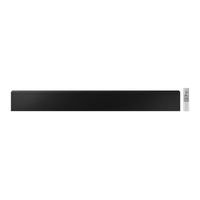
![Samsung HW-LST70T Bedienungsanleitung]()
Inhaltsverzeichnis
-
-
-
Checking the Components
7
-
Inserting Batteries before Using the Remote Control (AAA Batteries X 2)
8
-
-
Front Panel / Bottom Panel of the Soundbar
9
-
Rear Panel of the Soundbar
10
-
Using the Remote Control
11
-
How to Use the Remote Control
11
-
Using the Hidden Buttons (Buttons with more than One Function)
14
-
Output Specifications for the Different Sound Effect Modes
14
-
Adjusting the Soundbar Volume with a TV Remote Control
15
-
Connecting the Soundbar
16
-
Connecting Electrical Power
16
-
How to Mount the AC/DC Adapter
16
-
Installing the Wall Mount
17
-
Installation Precautions
17
-
-
-
-
-
Using a Wired Connection to the TV
22
-
Connecting Using an Optical Cable
22
-
Using a Wireless Connection to the TV
24
-
Method 1. Connecting Via Bluetooth
24
-
Method 2. Connecting Via Wi-Fi
26
-
Connecting an External Device
27
-
Connecting Using an Optical Cable
27
-
Connecting a Mobile Device
28
-
Method 1. Connecting Via Bluetooth
28
-
Method 2. Connecting Via Wi-Fi (Wireless Network)
31
-
-
Connecting an Amazon Product
33
-
Connect and Use with an Amazon Product (Amazon Echo)
33
-
Use Voice Commands to Control the Soundbar
33
-
-
-
-
-
-
-
Open Source Licence Notice
37
-
Important Notes about Service
37
-
Specifications and Guide
38
-
-
-
-
-
-
-
-
-
-
-
-
-
-
-
-
-
-
-
-
-
-
-
-
-
-
-
-
-
-
-
-
-
-
-
-
-
-
-
-
-
-
-
-
-
-
-
-
-
-
De Componenten Controleren
85
-
Batterijen Plaatsen Vóór Gebruik Van de Afstandsbediening (AAA-Batterijen X 2)
86
-
-
Voorkant/Onderkant Van de Soundbar
87
-
Achterkant Van de Soundbar
88
-
De Afstandsbediening Gebruiken
89
-
Hoe de Afstandsbediening Gebruiken
89
-
De Verborgen Knoppen Gebruiken (Knoppen Met Meer Dan Een Functie)
92
-
Uitvoerspecificaties Voor de Verschillende Geluidseffecten
92
-
Het Volume Van de Soundbar Wijzigen Met de Afstandsbediening Van de
93
-
De Soundbar Aansluiten
94
-
De Elektriciteit Aansluiten
94
-
Hoe Wordt de Lichtnetadapter Bevestigd
94
-
De Wandmontage Installeren
95
-
Voorzorgsmaatregelen Bij de Installatie
95
-
-
Methode 2. Wandmontage
98
-
Een Bedrade Verbinding Naar de Tv Gebruiken
100
-
Verbinden Met Een Optische Kabel
100
-
Een Draadloze Verbinding Naar de Tv Gebruiken
102
-
Methode 1. Verbinden Via Bluetooth
102
-
Methode 2. Verbinden Via Wi-Fi
104
-
Een Extern Apparaat Verbinden
105
-
Verbinden Met Een Optische Kabel
105
-
Een Mobiel Apparaat Verbinden
106
-
Methode 1. Verbinden Via Bluetooth
106
-
Methode 2. Verbinden Via Wi-Fi (Draadloos Netwerk)
109
-
-
Een Product Van Amazon Verbinden
111
-
Een Product Van Amazon Verbinden en Gebruiken (Amazon Echo)
111
-
Gebruik Spraakopdrachten Om de Soundbar te Bedienen
111
-
-
-
-
-
-
-
Kennisgeving Open Source-Licentie
115
-
Belangrijke Opmerking over Service
115
-
Specificaties en Handleiding
116
-
-
Informations Relatives à la Sécurité
119
-
Vérification des Composants
124
-
Insertion des Piles Avant L'utilisation de la Télécommande (2 Piles AAA)
125
-
Vue D'ensemble du Produit
126
-
Panneau Avant / Panneau Inférieur de la Soundbar
126
-
Panneau Arrière de la Soundbar
127
-
Utilisation de la Télécommande
128
-
Comment Utiliser la Télécommande
128
-
Utilisation des Touches Dissimulées (Touches Avec Plus D'une Fonction)
131
-
Spécifications de Sortie pour les Différents Modes D'effets Sonores
131
-
Réglage du Volume de la Soundbar Avec une Télécommande de Téléviseur
132
-
Connexion de la Soundbar
133
-
Connexion de L'alimentation Électrique
133
-
Comment Monter L'adaptateur AC/CC
133
-
Installation de la Fixation Murale
134
-
Mesures de Sécurité Relatives à L'installation
134
-
Méthode 1. Fixation au Téléviseur
134
-
Exemple D'installation
134
-
Méthode 2. Fixation Murale
137
-
Connexion Filaire Avec le Téléviseur
139
-
Connexion à L'aide D'un Câble Optique
139
-
Connexion Sans Fil Avec le Téléviseur
141
-
Méthode 1. Connexion Via Bluetooth
141
-
Méthode 2. Connexion Via Wi-Fi
143
-
Connexion D'un Appareil Externe
144
-
Connexion à L'aide D'un Câble Optique
144
-
Connexion D'un Appareil Mobile
145
-
Méthode 1. Connexion Via Bluetooth
145
-
Méthode 2. Connexion Via Wi-Fi (Réseau Sans Fil)
148
-
Utilisation de la Fonction Tap Sound
149
-
Connexion D'un Produit Amazon
150
-
Connecter et Utiliser un Produit Amazon (Amazon Echo)
150
-
Utilisez les Commandes Vocales pour Contrôler la Soundbar
150
-
Mise à Jour du Logiciel
151
-
Mise à Jour Automatique
151
-
-
-
-
-
Remarque Importante Àpropos du Service
154
-
Spécifications Et Guide
155
-