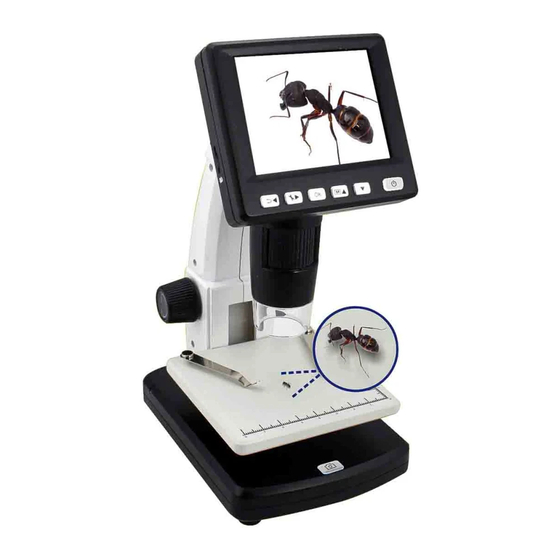
RS Pro 196-4076 Handbücher

RS Pro 196-4076 Handbücher

Anleitungen und Benutzerhandbücher für RS Pro 196-4076. Wir haben 1 RS Pro 196-4076 Anleitung zum kostenlosen PDF-Download zur Verfügung: Benutzerhandbuch

RS Pro 196-4076 Benutzerhandbuch (270 Seiten)

Tragbare Standalone-Ausführung
Marke: RS Pro | Kategorie: Mikroskope | Dateigröße: 25 MB
Inhaltsverzeichnis
  • Inhaltsverzeichnis
    3
  • Precaution
    5
  • Preparation
    8
  • Standard Accessories
    8
  • Key Features
    10
  • Use the Microscope
    11
  • Install Battery
    11
  • Insert a Microsd Card
    12
  • Display Icons & Meanings
    13
  • Turn on the Microscope
    14
  • Turn off the Microscope
    14
  • How to Capture
    15
  • Download to Computer
    22
  • Preview on Computer
    22
  • Charge Battery
    23
  • Output to TV
    24
  • Menu Introductions
    25
  • Set Resolution
    25
  • Timer
    26
  • Quality
    27
  • Sharpness
    28
  • Language
    29
  • Power Save
    29
  • Date Stamp
    30
  • TV out
    30
  • Date/Time
    31
  • Format SD
    31
  • System Reset
    32
  • Version
    32
  • Specifications
    33
  • Computer System Minimum Requirement
    33
  • Troubleshooting
    34
  • PC Software Introductions
    35
  • Install the Software
    35
  • Start Microscope
    36
  • Software Functions
    37
  • Capture Photo
    37
  • Capture Video
    37
  • Timer
    38
  • Calibration and Measurement
    39
  • Calibration
    39
  • Measurement
    43
  • Change Calibration
    44
  • Draw and Text
    47
  • Software Interface Instructions
    48
  • Main Interface Icons
    48
  • Main Menu
    49
  • Options
    50
  • Capture
    51
  • Measurement Interface Instructions
    52
  • APK for Android
    53
  • Precauzione
    59
  • Preparazione
    62
  • Accessori Standard
    62
  • Nomi E Funzioni Dei Componenti
    63
  • Caratteristiche Principali
    64
  • Utilizzare Il Microscopio
    65
  • Installare la Batteria
    65
  • Inserire una Scheda Microsd
    66
  • Icone Visualizzate E Significati
    67
  • Accendere Il Microscopio
    68
  • Spegnere Il Microscopio
    68
  • Come Acquisire
    69
  • Download Su Computer
    76
  • Anteprima Sul Computer
    76
  • Caricare la Batteria
    77
  • Uscita Su TV
    78
  • Introduzione Ai Menu
    79
  • Timer
    80
  • Qualità
    81
  • Nitidezza
    82
  • Lingua
    83
  • Risparmio Energetico
    83
  • Indicazione Della Data
    84
  • Uscita TV
    84
  • Data/Ora
    85
  • Formattare la Scheda SD
    85
  • Ripristino del Sistema
    86
  • Versione
    86
  • Specifiche
    87
  • Risoluzione Dei Problemi
    88
  • Introduzione al Software Per PC
    89
  • Installare Il Software
    89
  • Avviare Il Microscopio
    90
  • Funzioni Software
    91
  • Acquisire Foto
    91
  • Timer
    92
  • Calibrazione E Misurazione
    93
  • Calibrazione
    93
  • Misurazione
    97
  • Modificare la Calibrazione
    98
  • Disegnare E Aggiungere Testo
    101
  • Istruzioni Dell'interfaccia Software
    102
  • Icone Dell'interfaccia Principale
    102
  • Menu Principale
    103
  • Opzioni
    104
  • Istruzioni Dell'interfaccia DI Misurazione
    106
  • APK Per Android
    107
  • Précautions
    113
  • Préparation
    116
  • Accessoires Standards
    116
  • Désignations et Fonctions des Pièces
    117
  • Caractéristiques Principales
    118
  • Utilisation du Microscope
    119
  • Installation de la Batterie
    119
  • Insertion D'une Carte Microsd
    120
  • ICônes de L'affichage et Significations
    121
  • Mise en Marche du Microscope
    122
  • Arrêt du Microscope
    122
  • Comment Capturer
    123
  • Transfert Sur L'ordinateur
    130
  • Aperçu Sur L'ordinateur
    130
  • Recharge de la Batterie
    131
  • Sortie Vers TV
    132
  • Présentation du Menu
    133
  • Réglage de la Résolution
    133
  • Timer
    134
  • Qualité
    135
  • Netteté
    136
  • Langue
    137
  • Économie D'énergie
    137
  • Horodatage
    138
  • Sortie TV
    138
  • Date/Heure
    139
  • Formatage de la Carte SD
    139
  • Réinitialisation du Système
    140
  • Version
    140
  • Spécifications
    141
  • Configuration Minimale Requise du Système Informatique
    141
  • Dépannage
    142
  • Présentation du Logiciel Informatique
    143
  • Installation du Logiciel
    143
  • Démarrage du Microscope
    144
  • Fonctions du Logiciel
    145
  • Capture Photo
    145
  • Capture VIDéo
    145
  • Timer
    146
  • Étalonnage et Mesure
    147
  • Étalonnage
    147
  • Mesure
    151
  • Modification de L'étalonnage
    152
  • Dessin et Texte
    155
  • Instructions de L'interface du Logiciel
    156
  • ICônes de L'interface Principale
    156
  • Menu Principal
    157
  • Options
    158
  • Capture
    159
  • Instructions de L'interface de Mesure
    160
  • APK pour Android
    161
  • Precaución
    166
  • Preparación
    170
  • Accesorios de Serie
    170
  • Nombres y Funciones de Los Componentes
    171
  • Principales Características
    172
  • Uso del Microscopio
    173
  • Colocación de la Batería
    173
  • Introducción de una Tarjeta Microsd (no Incluida)
    174
  • Inserción de una Tarjeta Microsd
    174
  • Iconos y Significados
    175
  • Encendido del Microscopio
    176
  • Apagado del Microscopio
    176
  • Instrucciones de Captura
    177
  • Descarga en un Ordenador
    183
  • Vista Previa en Ordenador
    183
  • Carga de la Batería
    185
  • Conexión de Salida a Televisor
    185
  • Introducción al Menú
    187
  • Selección de la Resolución
    187
  • Temporizador
    188
  • Calidad
    189
  • Menú Principal
    190
  • Nitidez
    191
  • Idioma
    191
  • Ahorro de Energía
    191
  • Marca de Fecha
    192
  • Salida de Televisión
    192
  • Fecha/Hora
    193
  • Formateo de Tarjeta SD
    193
  • Restablecimiento del Sistema
    194
  • Versión
    194
  • Características Técnicas
    195
  • Requisitos Mínimos de Ordenador para el Sistema
    195
  • Resolución de Problemas
    196
  • Instrucciones de la Interfaz de Software
    196
  • Introducción al Software para PC
    197
  • Instalación del Software
    197
  • Arranque del Microscopio
    198
  • Funciones de Software
    199
  • Captura de Fotografías
    199
  • Captura de Vídeo
    199
  • Temporizador
    200
  • Calibración y Medición
    201
  • Calibración
    201
  • Medición
    205
  • Modificación de la Calibración
    206
  • Dibujo y Texto
    209
  • Iconos de la Interfaz Principal
    210
  • Menú Principal
    211
  • Opciones
    212
  • Captura
    213
  • Instrucciones de la Interfaz de Medición
    214
  • APK para Android
    215
  • Zeitgeber
    242
  • Qualität
    243
  • Schärfe
    244
  • Sprache
    245
  • Version
    248
  • Zeitgeber
    254
  • Messung
    259
  • Optionen
    266