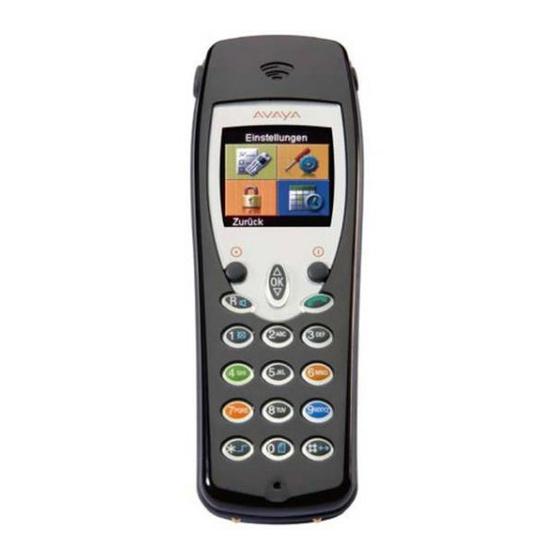
Industrial DECT-Telephone
Inhaltsverzeichnis
General Safety Information for All Unit Versions
77
Approval and EC Conformity
77
Protection against Endangering of Your Hearing
78
Protection against the Influence of Electronic Body Aids
78
Protection of Business Handset against Intervention and Environmental Influences
79
Protection of Other Units against Malfunctions Caused by the Busi- Ness Handset
79
Handling Batteries, Dispatch, Storage, Battery Replacement
80
Care Information for Lithium Ion Batteries
81
End User Information on the Environmentally Friendly Disposal of Old Units and Empty Batteries
82
Front View of the Handset IH4
84
Content of Present Operating Manual
86
Shipping Package of One Set
86
Where to Use Your Business Handset
87
Advice on the Place of Installation
87
Information for Operation
87
Emission of Radio Signals
87
Conventions and Information Used in this Manual
88
Menu Names, Text Entries, Displays
88
References to Sections and to Headings
88
Hint for an Additional Information
88
Putting into Operation
90
If Your Business Handset Has Not yet Been Assembled
90
If Your Business Handset Comes Completely Assembled
90
Calling up the Main Menu
91
Quick Menu Selection from the Main Menu
91
Shortcuts for Menu Selection from the Main Menu
92
Alternative Way for Menu Selection from the Main Menu
92
Selection of Sub-Menus from Other Menu Levels
93
Display Sections, Display Lines
94
Meaning of the Symbols in the Status Line
96
Basic Rules for Operation
100
Switching on the Business Handset
100
Switching off the Business Handset
100
Left and Right Softkey
100
Double-Assignment Keys
102
Changing to the Basic Condition
102
Activating the Key Lock with a Key Sequence
102
Deactivating the Key Lock
102
Automatic Keyboard Lock
103
Changing the Earpiece Volume Temporarily During a Conversation
103
The Telephone Features
105
Making Phone Calls as Usual
105
Calling (Block Dialling)
105
Calling from the Phonebook
106
Calling from the Phonebook, Quick Access
106
Calling from the Redial, Missed or Answered Calls Lists
107
Terminate the Conversation
108
Disable Acoustic Call Signalling (Quick Access)
109
Open Listening, Switching the Microphone off
110
Activating / Deactivating the Handsfree Talking Function
110
Switching the Microphone Off/On (Mute On/Off)
110
Releasing an Emergency Call with the Emergency Call Button
112
Releasing an Emergency Call
112
Using the Positon Alarm
113
Making a Phonebook Entry
114
Making an Entry Manually
114
Transferring an Entry from One of the Call Lists
114
Editing an Existing Entry in the Phonebook
114
Setting up Functions as a Phonebook Entry
114
The Integral 5 Telephone Functions
115
The GAP Telephone Functions
116
Making Phone Calls to Another Internal Handset of Your Private GAP Base Station
116
Adapting the Handset to Your Requirements
118
Survey at Settings and Extras
118
Switching off the Ring Tone
122
Deleting the Message from the Display
122
Deleting the Message Definitively
122
Manual Acknowledgement
122
Message Lists and Call Lists
123
More Messaging Features
126
Transmitting a Message
126
Transmitting a Fixed Text
126
Transmitting a Fixed Text with Added Digits
126
Transmitting a Direct Call
126
Technical Data / Accessories
127
Care, Maintenance, Ambient Conditions
129
Francais IH4 Raccordé a Integral Enterprise 139
Conseils Généraux de Sécurité pour Tous les Modèles D'appareil
139
Homologation et Conformité CE
139
Protection de Votre Ouïe
140
Protection Contre L'influence Sur des Prothèses Électroniques
140
Protection du Combiné D'affaires des Interventions et des Condi- Tions Ambiantes
141
Protection D'autres Appareils des Perturbations de Fonctionnement Engendrées Par le Combiné D'affaires
141
Comportement Avec les Accumus , Expédition, Entreposage et Changement
142
Conseils D'entretien des Accumulateurs Li Ion
143
Utilisation des Chargeurs
143
Information de la Clientèle Sur la Mise au Rebut D'appareils Anciens ou D'accus Usés
145
Où Pouvez-Vous Utiliser Votre Combiné D'affaires
149
Conseils de Mise en Place
150
Conseils Relatifs à L'exploitation
150
Emission de Signaux Radio
150
Façons D'écrire et Remarques de Cette Notice
151
Noms des Menus, Encarts de Texte, Affichages
151
Renvoi Vers Chapitres ou Vers Titres
151
Indication D'une Information Complémentaire
151
Indication D'un Conseil Pratique
152
Si Votre Combiné D'affaires N'est Pas Encore Monté
153
Si Votre Combiné et Déjà Complètement Monté et Équipé
153
Ecran et Touches Soft
154
Appel du Menu Principal
154
Sélection Rapide de Menus à Partir du Menu Principal
154
Shortcuts pour Sélection de Menus à Partir du Menu Principal
155
Alternative de Sélection de Menu à Partir du Menu Principal
155
Choix de Sous-Menus a à Partir D'autres Niveaux de Menu
156
Constitution de L'écran
157
Règles Fondamentales D'utilisation
162
Brancher le Combiné D'affaires
162
Couper le Combiné D'affaires
162
Touches Soft de Droite et de Gauche
162
Touches de Numérotation
163
Touches de Numérotation Colorées
163
Touche à Double Fonction
164
Passer en Mode de Repos
164
Activer le Blocage de Clavier Par une Combinaison de Touches
164
Blocage Automatique du Clavier
165
Modifier Provisoirement le Volume Lors D'une Communication
165
Les Caractéristiques Téléphoniques
167
Téléphoner comme Vous en Avez L'habitude
167
Appel, Sélection de Bloc
167
Appeler à Partir de L'annuaire Téléphonique
168
Appel de L'annuaire, Accès Rapide
168
Appeler à Partir des Listes Répétition de Numérotation, Appels Manqués ou Pris
169
Terminer la Conversation
170
Empêcher la Sonnerie D'appel (Accès Rapide)
171
Communications Sur Haut-Parleur, Coupure du Microphone
172
Activer le Mode Mains-Libres
172
Couper le Microphone (Passer en Muet) et Vice Versa
172
Déclencher un Appel D'urgence Par la Touche D'appel D'urgence
174
Déclencher un Appel D'urgence
174
De Plus Amples Caractéristiques Téléphoniques
175
Procéder à une Entrée Dans L'annuaire Téléphonique
175
Procéder à une Saisie Manuelle
175
Prendre un Encart D'une des Listes Téléphoniques
175
Modifier un Encart de L'annuaire Téléphonique
175
Paramétrer une Fonction en tant Qu'encart Dans L'annuaire Téléphonique175
175
Installation Téléphonique Integral 5
176
Installation Téléphonique GAP
178
Adapter le Combiné à Vos Contraintes
180
Réception D'un Message
184
Interrompre la Tonalité D'appel
184
Effacer le Massage de L'écran
184
Effacer Définitivement le Message
184
Listes de Messages et D'appels
185
De Plus Amples Caractéristiques de la Messagerie
189
Emettre un Texte Fixe
189
Emettre un Texte Fixe Suivi de Chiffres
189
Emettre un Appel Direct
189
Caractéristiques Techniques / Accessoires
190
Combiné D'affaires IH4
190
Entretien, Maintenance, Conditions Ambiantes
192
Garantie / Service-Après-Vente
200