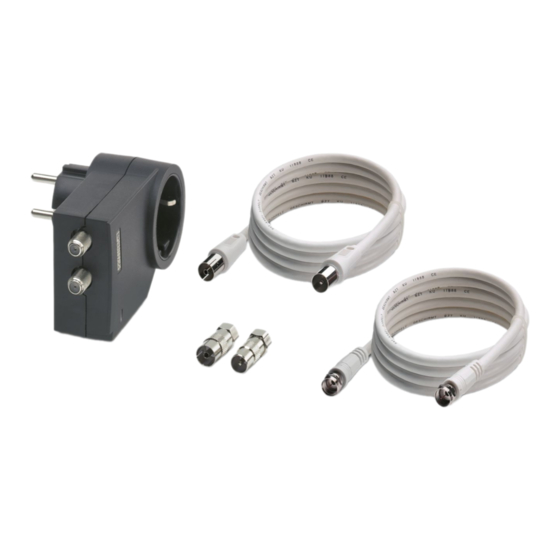
Phoenix Contact MNT-TV-SAT B/F Einbauanweisung
Quicklinks
FRANÇAIS
Protection antisurtension pour équipements
terminaux avec raccordement secteur 230 V
et entrée d'antenne (SPD classe IlI, type 3)
– Pour réseaux à 3 fils (L, N, PE)
– Pour systèmes TN / TT / IT
– Protection combinée pour alimentation, antenne/câble TV et
installation SAT
– Type de connecteur E (CEE 7/5)
– Avec connecteur F et adaptateur CEI
1. Consignes de sécurité
AVERTISSEMENT : risque de choc électrique et risque
d'incendie
Avant l'installation, contrôler que l'appareil ne présente pas
de dommages extérieurs. Si l'appareil est défectueux, il ne
doit pas être utilisé.
AVERTISSEMENT : Fusible en amont
Pour les systèmes TT : installer l'appareil uniquement en
aval du disjoncteur différentiel (RDC).
2. Installation ()
• Brancher la protection MNT sur la prise.
• Raccorder la protection MNT à la prise de raccordement TV à
l'aide du câble de raccordement correspondant fourni.
• Raccorder ensuite l'appareil à protéger à la protection MNT via
un câble de raccordement supplémentaire équipé d'un
connecteur F.
REMARQUE :
Pour le raccordement à une prise de raccordement avec
connecteur CEI, raccorder la protection MNT aux câbles
via l'adaptateur fourni. ()
• Brancher le connecteur secteur de l'appareil à protéger sur la
protection MNT.
IMPORTANT :
Ne pas enficher plusieurs protections l'une dans l'autre.
Cela endommagerait votre prise. ()
3. Affichage d'état ()
L'extinction du voyant de diagnostic et d'état signifie qu'aucune
tension de service n'est appliquée ou que la protection
antisurtension n'est plus active.
• Contrôler l'alimentation en tension.
• Si l'alimentation en tension n'est pas interrompue, remplacer la
protection MNT.
4. Mesure d'isolation
• Retirer la protection MNT de la prise avant d'effectuer une
mesure de l'isolement de l'installation. Dans le cas contraire,
des erreurs de mesure sont possibles.
• Rebrancher à nouveau l'appareil sur la prise une fois la mesure
de l'isolement terminée.
Caractéristiques techniques
Caractéristiques électriques
Electrical data
Classe d'essai CEI / Types EN
IEC test classification / EN type
Nombre de ports
Number of ports
Tension nominale U
AC
Nominal voltage U
N
Tension permanente maximale U
Maximum continuous operating voltage U
C
L-N / L-PE / N-PE
Courant résidual I
Residual current I
PE
Courant de court-circuit assigné I
Short-circuit current rating I
SCCR
Choc combiné U
Combination wave U
OC
Niveau de protection U
Protection level U
p
L-N / L-PE / N-PE
Courant nominal de décharge I
(8/20) µs
Nominal discharge current I
n
Courant de charge nominal I
Rated load current I
L
Protection max. en amont nécessaire
Max. required back-up fuse
Caractéristiques générales
General data
Température ambiante (fonctionnement)
Ambient temperature (operation)
Humidité de l'air admissible (service)
Permissible humidity (operation)
Indice de protection
Degree of protection
Normes d'essai
Test standards
ENGLISH
Surge protection for termination devices
with 230 V mains connection and antenna
input (SPD class III, type 3)
– For 3-conductor networks (L, N, PE)
– For TN / TT / IT systems
– Combined protection for power supply, TV antenna/cable and
SAT system
– Plug type E (CEE 7/5)
– With F connector and IEC adapter
1. Safety notes
WARNING: Risk of electric shock and fire
Check the device for external damage before installation. If
the device is defective, it must not be used.
WARNING: required backup fuse
For TT systems: install the device behind the RCD
exclusively.
2. Installation ()
• Plug the MNT into the socket.
• Connect the MNT to the TV junction box using the
corresponding connecting cable included.
• Then connect the device to be protected to the MNT via a further
connecting cable with an F connector.
NOTE:
When connecting to an IEC connector junction box, make
sure to connect the MNT to the cables via the included
adapter. ()
• Plug the mains plug of the device to be protected into the MNT.
NOTE:
Do not plug multiple MNTs into each other; this might
damage your socket. ()
3. Status indicator ()
If the green status indicator goes off, either there is no operating
voltage, or the surge protection is no longer active.
• Check the voltage supply.
• If the voltage supply is not uninterrupted, replace the MNT.
4. Insulation testing
• Disconnect the MNT before conducting insulation testing on the
system. Otherwise, faulty measurements may occur.
• Plug the device back into the socket after insulation testing.
Technical data
Technische Daten
Elektrische Daten
IEC Prüfklasse / EN Type
Anzahl der Ports
AC
Nennspannung U
N
N
Höchste Dauerspannung U
C
L-N / L-PE / N-PE
Schutzleiterstrom I
PE
PE
Kurzschlussfestigkeit I
SCCR
SCCR
Kombinierter Stoß U
OC
OC
Schutzpegel Up
p
L-N / L-PE / N-PE
(8/20) µs
Nennableitstoßstrom I
n
n
Nennlaststrom I
L
L
Erforderliche Vorsicherung maximal
Allgemeine Daten
Umgebungstemperatur (Betrieb)
Zulässige Luftfeuchtigkeit (Betrieb)
Schutzart
Prüfnormen
DEUTSCH
Überspannungsschutz für Endgeräte mit
230 V-Netzanschluss und Antenneeingang
(SPD Class III, Typ 3)
– Für 3-Leiter-Netze (L, N, PE)
– Für TN- / TT- / IT-Systeme
– Kombinierter Schutz für Stromversorgung, TV-Antenne/-Kabel
und SAT-Anlage
– Steckertyp E (CEE 7/5)
– Mit F-Connector und IEC-Adapter
1. Sicherheitshinweise
WARNUNG: Gefahr durch elektrischen Schlag und
Brandgefahr
Prüfen Sie vor der Installation das Gerät auf äußere
Beschädigung. Wenn das Gerät defekt ist, darf es nicht
verwendet werden.
WARNUNG: Notwendige Vorsicherung
Für TT-Systeme: Installieren Sie das Gerät ausschließlich
hinter dem Fehlerstromschutzschalter (RCD).
2. Installieren ()
• Stecken Sie den MNT in die Steckdose.
• Verbinden Sie den MNT mit der TV-Anschlussdose, nutzen Sie
hierzu das entsprechende beiliegende Anschlusskabel.
• Verbinden Sie anschließend das zu schützende Gerät mit dem
MNT über ein weiteres Anschlusskabel mit F-Connector.
HINWEIS:
Beim Anschluss an eine IEC-Connector-Anschlussdose
müssen Sie den MNT über die beiliegenden Adapter mit
den Kabeln verbinden. ()
• Stecken Sie den Netzstecker des zu schützenden Gerätes in
den MNT ein.
ACHTUNG:
Stecken Sie nicht mehrere MNT ineinander. Ihre Steckdose
könnte beschädigt werden. ()
3. Statusanzeige ()
Wenn die grüne Statusanzeige erlischt, liegt entweder keine
Betriebsspannung an oder der Überspannungsschutz ist nicht
mehr aktiv.
• Überprüfen Sie die Spannungsversorgung.
• Ist die Spannungsversorgung nicht unterbrochen, tauschen sie
den MNT aus.
4. Isolationsmessung
• Ziehen Sie vor einer Isolationsmessung in der Anlage den MNT
aus der Steckdose. Anderenfalls sind Fehlmessungen möglich.
• Stecken Sie das Gerät nach der Isolationsmessung wieder in
die Steckdose ein.
III ,
/ T3
One
AC
230/400 V AC (TN)
230/400 V AC (TT)
230 V AC (IT)
275 V AC / 360 V AC / 360 V AC
C
L-N / L-PE / N-PE
≤ 1 µA
1,5 kA AC
4 kV
≤ 1,2 kV / ≤ 1,5 kV / ≤ 1,5 kV
L-N / L-PE / N-PE
(8/20) μs
3 kA
16 A (30 °C)
16 A AC (gG / B / C)
-25 °C ... 75 °C
5 % ... 95 %
IP20
IEC 61643-11 / EN 61643-11 / EN 61643-21/A2 /
IEC 61643-21/A2 / DIN EN 50083-2
PHOENIX CONTACT GmbH & Co. KG
Flachsmarktstraße 8, 32825 Blomberg, Germany
Fax +49-(0)5235-341200, Phone +49-(0)5235-300
phoenixcontact.com
DE
Einbauanweisung für den Elektroinstallateur
EN
Installation notes for electricians
FR
Instructions d'installation pour l'électricien
MNT-TV-SAT B/F
F-Connector
IEC-Connector
© PHOENIX CONTACT 2015
MNR 9067086 - 00
2015-03-30
2882307
SAT RECEIVER

Verwandte Anleitungen für Phoenix Contact MNT-TV-SAT B/F


Inhaltszusammenfassung für Phoenix Contact MNT-TV-SAT B/F
- Seite 1 PHOENIX CONTACT GmbH & Co. KG FRANÇAIS ENGLISH DEUTSCH Flachsmarktstraße 8, 32825 Blomberg, Germany Protection antisurtension pour équipements Surge protection for termination devices Überspannungsschutz für Endgeräte mit Fax +49-(0)5235-341200, Phone +49-(0)5235-300 phoenixcontact.com MNR 9067086 - 00 2015-03-30 terminaux avec raccordement secteur 230 V with 230 V mains connection and antenna 230 V-Netzanschluss und Antenneeingang...
- Seite 2 PHOENIX CONTACT GmbH & Co. KG ČEŠTINA POLSKI NEDERLANDS Flachsmarktstraße 8, 32825 Blomberg, Germany Přepěťová ochrana pro koncová zařízení se Ochrona przed przepięciami dla urządzeń Overspanningsbeveiliging voor Fax +49-(0)5235-341200, Phone +49-(0)5235-300 phoenixcontact.com MNR 9067086 - 00 2015-03-30 síťovým připojením 230 V a anténním końcowych z przyłączem sieciowym 230V i...