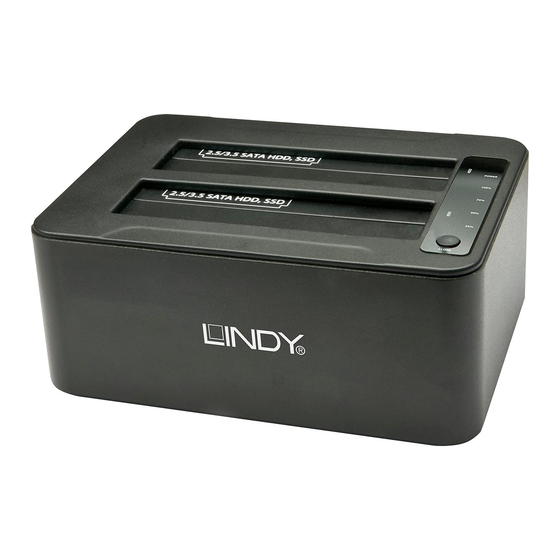
Lindy 43116 Benutzerhandbuch
Verfügbare Sprachen
Verfügbare Sprachen
USB 3.0 Docking & Clone
User Manual
Benutzerhandbuch
Manuel Utilisateur
Manuale
LINDY No. 43116
www.lindy.com
Tested to Comply with FCC Standards
For Home and Office Use!
© LINDY ELECTRONICS LIMITED & LINDY-ELEKTRONIK GMBH - First Edition (August 2014)
Overview
The LINDY USB 3.0 HDD Docking & Clone Station can be used as both
a dual HDD SATA docking station and standalone HDD cloning station
that creates a bit-by-bit clone of the source HDD onto a target HDD,
twice as fast as other USB 3.0 Cloning Stations.
The USB 3.0 HDD Docking & Clone Station also provides additional
features for Windows computers following the installation of the included
software.
A Software Clone function allows you to choose if you use an external or
internal hard drive as the cloning source for the target hard drive. It is
also possible to clone from bigger to smaller hard drives, with software
that resizes the partition accordingly.
Note - a completely full, bigger hard drive cannot be copied to a smaller
one.
FlashCopy allows cloning to be carried out twice as fast as with standard
Clone Stations, even via a USB 2.0 connection.
DiskErase allows you to completely delete the data on the hard drive
safely, securely and permanently.
Features
• Computer connection via USB 3.0 SuperSpeed (5 Gbps), backwards
compatible with USB 2.0
• Connects 2 SATA HDD/SSDs to a computer using a single connector
• SATA 3.0 Gbps standard
• Accepts 1.8/2.5/3.5" HDD/SSDs with 22 pin SATA combo interface.
For Micro SATA please use LINDY adapter No. 33502.
• Supports auto spin down after being idle for 5 minutes
• Compatible with Windows, Mac OS, Linux; Software support only for
Windows computers
Station Premium
English
Deutsch
Français
Italiano
English
English
Package Contents
1x
SATA Docking & Cloning Station
1x
Power Supply 100-240VAC / 12V DC 3A
1x
Power Cord
1x
USB 3.0 cable
1x
CD with software
1x
This Manual
Installation and Use
• Connect the power supply
• For normal docking station operation connect the Docking Station to
your computer with the USB 3.0 cable provided
• Insert the HDDs into the docking station and press the power switch
ON
• Wait until the drivers are loaded by the computers operating system
(OS) – you should then see the drives in the file manager program
• Before detaching the HDDs make sure the data transfer processes is
complete and that the activity light is not lit.
Hardware CLONE Function
Make sure that no data is stored on the target hard drive – otherwise you
will completely overwrite it during the clone process!
• If you want to clone HDDs, do not connect the Docking Station to
your computer
• The target HDD must be of equal or larger capacity than the source
HDD
• Make sure target HDD is empty and not partitioned (i.e. by using,
your operating system disk management utility)
• Install the source and target HDDs into the appropriately labelled bay
(Source and Target)
• Press the power switch ON
• Press the Clone button until the blue LED starts to flash, then press
the Clone button again. The Clone process will start and the 25%
LED will flash. The per cent status changes as clone progresses.
The 100% LED flashes once the clone process has ended. Do not
switch OFF or unplug the HDDs during the cloning process!
English
English
English
Inhaltsverzeichnis

Verwandte Anleitungen für Lindy 43116


Inhaltszusammenfassung für Lindy 43116
- Seite 5 Einführung Deutsch Lieferumfang Deutsch Die LINDY USB 3.0 HDD Docking & Clone Station kann sowohl als Dual HDD Docking Station wie auch als Clone Station zum bitweisen Kopieren SATA Docking & Clone Station (Klonen) Festplatten verwendet werden. Bereits beim Netzteil 100-240VAC / 12V DC 3A...
- Seite 6 Es ist möglich entweder die externe Festplatte zu klonen, das heißt die Aber auch die Festplatte des Computers kann als Quelle dienen. Quellfestplatte im „Source“ Port wird auf die Zielfestplatte im „Target“ Zielfestplatten können dann beide Festplatten in der USB 3.0 HDD Port geklont.
- Seite 7 DiskErase Funktion Deutsch Mit der Software „DiskErase“ können alle Daten auf den Festplatten zuverlässig gelöscht werden. Es gibt 18 genormte Algorithmen zum Löschen der Daten auf der Festplatte: 19. One Pass Zeros (1 pass). 20. One Pass Random (1 Pass) 21.
-
Seite 15: Risoluzione Dei Problemi
LINDY Herstellergarantie d’application correspondant à l’élimination des déchets électriques ou électroniques de votre pays. LINDY gewährt für dieses Produkt über die gesetzliche Regelung hinaus eine zweijährige Italy Herstellergarantie ab Kaufdatum. Die detaillierten Bedingungen dieser Garantie finden Sie Nel 2006 l’unione europea ha introdotto regolamentazioni (WEEE) per la raccolta e il auf der LINDY Website aufgelistet bei den AGBs.