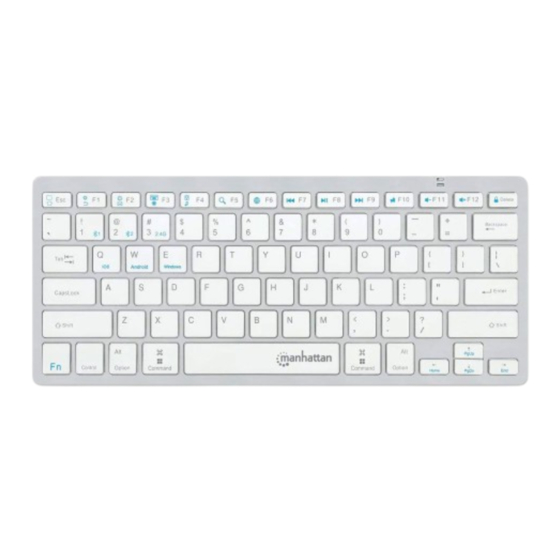
Manhattan 180566 Anleitung

Verwandte Anleitungen für Manhattan 180566


Inhaltszusammenfassung für Manhattan 180566
- Seite 1 Ultra Slim Dual-Mode Wireless Keyboard Instructions Model 180566 Important: Read before use. • Importante: Leer antes de usar. For additional benets: Scan to register your product warranty or go to: register.manhattanproducts.com/r/180566...
- Seite 2 Instructions This keyboard can connect to three devices at once: two through Bluetooth and one through the USB receiver. See step 3 to connect/pair different devices. 1 Insert 2 AAA batteries (included) into the battery compartment on the back of the keyboard and replace the cover. 2 Set the power switch to Connect/pair devices.
- Seite 3 Use keyboard with Android device Use keyboard with Windows device Switch to Bluetooth device Switch to Bluetooth device Switch to device using USB receiver For specifications, please visit manhattanproducts.com . Register your product at register.manhattanproducts.com/r/180566 or scan the QR code on the cover. English...
- Seite 4 Anleitung Diese Tastatur kann mit drei Geräten gleichzeitig verbunden werden: zwei via Bluetooth und eines über den USB-Empfänger. Siehe Schritt 3, um mehrere Geräte zu verbinden / zu koppeln. 1 Legen Sie 2 AAA-Batterien (Lieferumfang) in das Fach auf der Rückseite der Tastatur ein und setzen Sie die Abdeckung wieder auf.
-
Seite 5: Funktionen
Tastatur mit Android-Gerät verwenden Tastatur mit Windows-Gerät verwenden Zu Bluetooth-Gerät wechseln Zu Bluetooth-Gerät wechseln Zu einem Gerät über den USB-Empfänger wechseln Die Spezifikationen finden Sie auf manhattanproducts.com . Registrieren Sie Ihr Produkt at register.manhattanproducts.com/r/180566 oder scannen Sie den QR-Code auf dem Deckblatt. Deutsch... - Seite 6 Instrucciones Este teclado puede conectarse a tres dispositivos a la vez: dos a través de Bluetooth y uno a través del receptor USB. Consulte el paso 3 para conectar/vincular diferentes dispositivos. 1 Inserte 2 baterías AAA (incluidas) en el compartimento de parte trasera del teclado y recoloque la tapa.
- Seite 7 Use keyboard with Windows device Switch to Bluetooth device 1 Switch to Bluetooth device 2 Switch to device using USB receiver Para más especificaciones, visite manhattanproducts.com . Registre el producto en register.manhattanproducts.com/r/180566 o escanee el código QR en la cubierta. Español...
- Seite 8 Instructions Ce clavier vous permet de connecter jusqu’à trois appareils simultanément : deux par Bluetooth et un par câble USB. Référez-vous à l’étape 3 pour savoir comment connecter les différents appareils. 1 Insérez 2 piles AAA (incluses) dans le compartiment au verso du clavier et replacez le couvercle du compartiment.
- Seite 9 Utiliser le clavier avec Windows Passer au périphérique Bluetooth Passer au périphérique Bluetooth Passer à un périphérique USB Vous trouvez les spécifications sur manhattanproducts.com . Enregistrez votre produit sur register.manhattanproducts.com/r/180566 ou scannez le code QR figurant sur la couverture. Français...
- Seite 10 Instrukcje Ta klawiatura może łączyć się z trzema urządzeniami jednocześnie: dwoma przez Bluetooth i jednym przez odbiornik USB. Aby podłączyć/sparować różne urządzenia, patrz krok 3. 1 Włóż 2 baterie AAA (w zestawie) do przegrody na baterie znajdującej się z tyłu klawiatury i załóż pokrywę tej przegrody. Ustaw przełącznik zasilania w pozycji 3 Podłącz/sparuj urządzenia.
- Seite 11 Użyj klawiatury z urządzeniem Windows Przełącz na urządzenie Bluetooth Przełącz na urządzenie Bluetooth Przełącz na urządzenie, korzystając z odbiornika USB Vous trouvez les spécifications sur manhattanproducts.com . Enregistrez votre produit sur register.manhattanproducts.com/r/180566 ou scannez le code QR figurant sur la couverture. Polski...
- Seite 12 Istruzioni Questa tastiera può connettersi a tre dispositivi contemporaneamente: due tramite Bluetooth e uno tramite il ricevitore USB. Vedere il punto 3 per collegare/accoppiare diversi dispositivi. 1 Inserire 2 batterie AAA (incluse) nello scomparto batterie sul retro della tastiera e collocare il coperchio di chiusura dello scomparto. 2 Accendere la periferica posizionando l’interruttore su 3 Collegare/accoppiare dispositivi.
- Seite 13 Utilizzo della tastiera con dispositivo Windows Passare al dispositivo Bluetooth Passare al dispositivo Bluetooth Passare al dispositivo usando il ricevitore USB Vous trouvez les spécifications sur manhattanproducts.com . Enregistrez votre produit sur register.manhattanproducts.com/r/180566 ou scannez le code QR figurant sur la couverture. Italiano...
- Seite 14 WARRANTY AT: | GARANTIE AUF: | GARANTÍA EN: | GARANTIE À : | GWARANCJA NA: | GARANZIA A: manhattanproducts.com EN MÉXICO: Póliza de Garantía Manhattan — Datos del importador y responsable ante el consumidor IC Intracom México, S.A.P.I. de C.V. • Av. Interceptor Poniente # 73, Col. Parque Industrial La Joya, Cuautitlán Izcalli, Estado de México, C.P.
- Seite 15 : Urządzenie spełnia wymagania CE RED 2014/53/EU. Deklaracja zgodności dostępna jest na stronie internetowej producenta: ITALIANO : Questo dispositivo è conforme alla CE RED 2014/53/EU. La dichiarazione di conformità è disponibile al: support.manhattanproducts.com/barcode/180566 North & South America Asia & Africa...
- Seite 16 All trademarks and trade names are the property of their respective owners. © IC Intracom. All rights reserved. Manhattan is a trademark of IC Intracom, registered in the U.S. and other countries. Printed on recycled paper. MH_180566_QIG_1021_REV_5.11...