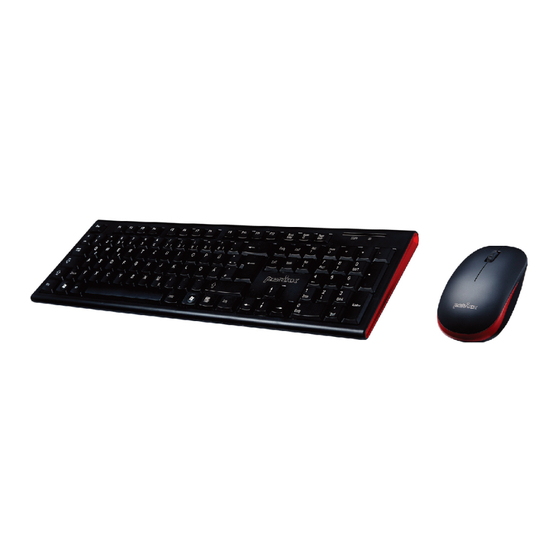
Perixx PERIDUO-711 Bedienungsanleitung
Verfügbare Sprachen
Verfügbare Sprachen
Quicklinks

Verwandte Anleitungen für Perixx PERIDUO-711


Inhaltszusammenfassung für Perixx PERIDUO-711
- Seite 1 Userls Guide AL-UE CREATOR...
- Seite 2 (1) year from the date of original invoice. If you discover a defect, Perixx will either repair or replace the product free of charge. You must contact Perixx for a Return Merchandise Authorization number (RMA) prior to returning any product.
- Seite 3 • All brand names, trademarks and logos are the properties of their respective owners. Please Note: Long-term repetitive use of any keyboard could cause injury to user. Perixx recommends users avoid excessive use of this or any keyboard.
- Seite 4 GA!aoay oueN O Imempu! sde) O (huaueq * sodi :esnon) Onchno uapun s! peoqÅa)1 uo fuaueq aqa uaqm (Laueq * s•dz qseg uns 'mempu! ega)umempu! eSQ10A mon Leue8 JQempu! POI -aeqwnN O iifiäiiii ¯'iifiäfiäi iiiiäiiii iäiiiiiäiiäi iii'iäiiäl —iiiiiiiäiUliüiiUiiUiiUiIUiii•iiUi w w 09 uogensnll! pnpoJd...
-
Seite 5: Product Specification
Product specification Color Black or White Interface Wireless 2.4G Keyboard: 442x142x18mm Size Mouse: 98x60x30mm Weight Keyboard: 416g Mouse: Material Windows XP and above OS requirement... - Seite 6 Installation Process I AAA* I AAA*...
- Seite 7 Consumption 4 mA 0.2mA 17gA When the keyboard is in power saving mode, press any key on PERIDUO-711 to reconnect. 2pcs of brand-new AAA battery (1250mAh*2=2500mAh) provides up to 160 days of use when you type about two hours a day.
- Seite 8 Instructions can be found within the battery compartment. Installation Process The following steps initiate a connection process of the PERIDUO-711 to your PC. 1. Turn ON the pc: 2. Insert Batteries 3. Plug the USB Receiver into a free USB Port 4.
- Seite 9 Deutsch (DE) Mit dem PERIDUO-711 hat man eine flexible und bequeme kabellose Umgebung durch das ergonomische Design. Das PERIDUO-711 bietet eine zuverlässige 2.4GHz Funkverbindung, eine niedrige Empfangsstörung und eine Empfangsreichweite bis zu 10 Meter System Voraussetzungen: - Betriebssysteme: Microsoft Windows ME/ 2000/Xp/Vista/7/8/10...
- Seite 10 Encontrarå las instrucciones en el compartimiento de las pilas. Instalaciön Para conectar PERIDUO-711 al ordenador debe seguir los siguientes pasos: 1. Encienda el ordenador 2. Coloque pilas 3. Enchufe eI receptor USB a un puerto USB libre 4.
- Seite 11 Les instructions se trouvent dans le compartiment å piles. Processus d'installation Les étapes ci-dessous indiquent le processus de connexion de PERIDUO-711 votre PC. 1. Allumer le PC : 2. Mettre en place piles 3. Brancher le récepteur USB dans un port USB libre.
- Seite 12 Italiano (IT) PERIDUO-711 permette di creare un ambiente di lavoro flessibile, comodo e wireless grazie al suo design ergonomico. PERIDUO-711 Offre un'affdabile penetrazione ad alta frequenza 2,4 GHz, un basso livello di interferenza e una trasmissione onnidirezionale del segnale con una...
- Seite 13 Nederlands (NL) Met PERIDUO-711 beschikt u over een flexibele, handige en draadloze werkomgeving dankzij het ergonomische ontwerp. PERIDUO-711 biedt een betrouwbare 2,4GHz hoge-frequentiepenetratie, lage interferentie en omni-directionele signaaltransmissies met 10 meter ontvangstbereik. Systeemvereisten - Besturingssysteem: Microsoft Windows ME/2000/XP/Vista/7/8/10 - 1 x Vrije USB-poort...
- Seite 14 PORTUGUES (PT) PERIDUO-711 cria um ambiente de trabalho flexivel com o seu design ergonömico e sem fios. PERIDUO-711 oferece uma ligaqäo 2.4GHz de confianqa com uma penetraqäo alta-frequéncia, baixa interferéncia e transmissäo omni-direccional até 10 metros. Requisitos de Sistema - Sistema Operativo: Microsoft Windows ME/2000/XP/Vista/7/8/IO...
- Seite 15 OL/8/L/QS!A/dX/OOOZ/3VN SMOPU!M:sogg- •zøugy...
- Seite 16 (sc) "*1-711 Windows ME/2000/XP/Vista/7/8/10...
- Seite 17 (TC) PERIDIJO-711 PERIDIJO-/II — ME/ 2000/XP/ViStd/7/8/10...
- Seite 18 Heerdter Landstrasse 189e, 40549 Düsseldorf, Germany Tel: +49211-56948800 Fax: +49211-569488-22 Declaration of Conformity Manufacturer's Name: Perixx Computer GmbH Manufacturer's Address: Heerdter Landstrasse 189e, 40549 Düsseldorf, Germany Declares that the product: Product Name: Wireless Combo Model Name: pERlDlJO-711 Conforms to the following...