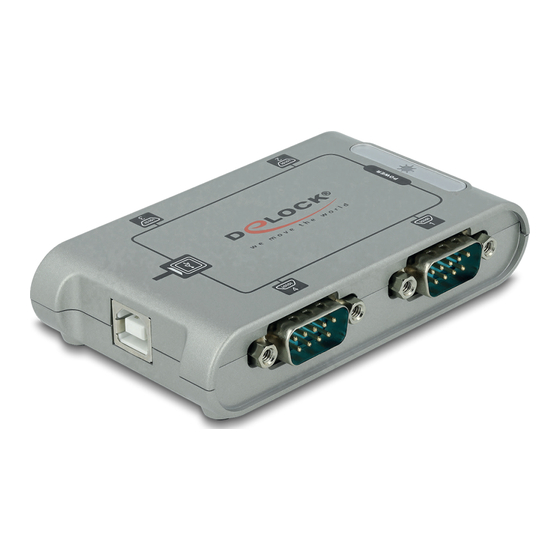
DeLOCK 87414 Bedienungsanleitung
Verfügbare Sprachen
Verfügbare Sprachen
User manual
Mode d'emploi
Uživatelská příručka
Manuale utente
Manual de utilizare
Korisnički priručnik
USB 2.0 to 4 x Serial RS-232 Adapter
Bedienungsanleitung
Manual del usuario
Instrukcja obsługi
Bruksanvisning
Használati utasítás
Εγχειρίδιο χρήστη
Product-No: 87414
User manual no: 87414-a
www.delock.com
Inhaltsverzeichnis

Verwandte Anleitungen für DeLOCK 87414


Inhaltszusammenfassung für DeLOCK 87414
- Seite 1 User manual Bedienungsanleitung Mode d’emploi Manual del usuario Uživatelská příručka Instrukcja obsługi Manuale utente Bruksanvisning Manual de utilizare Használati utasítás Korisnički priručnik Εγχειρίδιο χρήστη USB 2.0 to 4 x Serial RS-232 Adapter Product-No: 87414 User manual no: 87414-a www.delock.com...
- Seite 2 English Description The USB 2.0 to serial adapter by Delock enables you to connect 4 serial devices to a free USB port of your PC or laptop. Technical details • Connectors: 1 x USB 2.0 Type-B female 4 x serial RS-232 DB9 male •...
- Seite 3 Support Delock If you have further questions, please contact our customer support support@delock.de You can find current product information on our homepage: www.delock.com Final clause Information and data contained in this manual are subject to change without notice in advance. Errors and misprints excepted.
-
Seite 4: Beschreibung
Deutsch Beschreibung Der USB 2.0 zu Seriell Adapter von Delock ermöglicht Ihnen den Anschluss von bis zu 4 seriellen Geräten an einen freien USB Port Ihres PCs oder Notebooks. Technische Daten • Anschlüsse: 1 x USB 2.0 Typ-B Buchse 4 x Seriell RS-232 DB9 Stecker •... - Seite 5 Die in diesem Handbuch enthaltenen Angaben und Daten können ohne vorherige Ankündigung geändert werden. Irrtümer und Druckfehler vorbehalten. Copyright Ohne ausdrückliche schriftliche Erlaubnis von Delock darf kein Teil dieser Bedienungsanleitung für irgendwelche Zwecke vervielfältigt oder übertragen werden, unabhängig davon, auf welche Art und Weise oder mit welchen Mitteln, elektronisch oder mechanisch, dies geschieht.
- Seite 6 Français Instructions de sécurité • Protéger le produit contre l’humidité • Protéger le produit contre la lumière directe du soleil Installation du pilote Windows Vista/7/8.1/10/11 Allumez votre ordinateur. Connectez l'adaptateur USB sur un port USB disponible de votre ordinateur. Mettez le CD de pilotes dans le lecteur de CD ROM. Ouvrez l'Explorateur Windows, sélectionnez : CD-drive\MCS7840\WinXX\ MSSetup_QUADPORT.exe.
- Seite 7 Español Instrucciones de seguridad • Proteja el producto contra el polvo • Proteja el producto contra la luz solar directa Instalación del controlador Windows Vista/7/8.1/10/11 Encienda su PC. Conecte el adaptador USB a un puerto USB disponible de su equipo. Inserte el CD del controlador en la unidad de CD ROM.
- Seite 8 České Bezpečnostní pokyny • Chraňte produkt před vlhkostí • Chraňte produkt před přímým slunečním světlem Instalace ovladače Windows Vista/7/8.1/10/11 Zapněte počítač. Připojte adaptér k volnému USB portu počítače. Vložte CD s ovladači do mechaniky. Spusťte prohlížeč, zvolte: CD-mechanika\MCS7840\WinXX\ MSSetup_QUADPORT.exe. Windows zobrazí hlášku Pomocníka instalace. Klikněte na "Install"...
- Seite 9 Polsku Instrukcje bezpieczeństwa • Produkt należy zabezpieczyć przed wilgocią • Produkt należy zabezpieczyć przed bezpośrednim światłem słonecznym Instalacja sterownika Windows Vista/7/8.1/10/11 Włącz komputer. Podłącz adapter do wolnego portu USB komputera. Włóż płytę CD-ROM ze sterownikami. Otwórz Eksplorator Windows, wybierz: CD-drive\MCS7840\WinXX\ MSSetup_QUADPORT.exe.
- Seite 10 Italiano Istruzioni per la sicurezza • Proteggere il prodotto dall'umidità • Proteggere il prodotto dalla luce solare diretta Installazione del driver Windows Vista/7/8.1/10/11 Accendere il computer. Collegare l'adattatore ad una porta USB disponibile del computer. Inserire il CD del driver nell'unità CD ROM. Aprire Esplora risorse e selezionare unità...
-
Seite 11: Säkerhetsinstruktioner
Svenska Säkerhetsinstruktioner • Skydda produkten mot fukt • Skydda produkten mot direkt solljus Installation av drivrutiner Windows Vista/7/8.1/10/11 Slå på datorn. Anslut adaptern till en ledig USB-port på datorn. Placera CD-skivan med drivrutinerna i CD-enheten. Öppna Windows utforskaren och välj: CD-enhet\MCS7840\WinXX\ MSSetup_QUADPORT.exe. - Seite 12 Română Instrucţiuni de siguranţă • Protejaţi produsul împotriva umidităţii • Protejaţi produsul împotriva luminii directe a soarelui Instalarea driverului Windows Vista/7/8.1/10/11 Porniţi computerul. Conectaţi adaptorul la un port USB disponibil de pe computer. Introduceţi CD-ul cu drivere în unitatea CD ROM. Deschideţi Windows Explorer, selectaţi: CD-drive\MCS7840\WinXX\ MSSetup_QUADPORT.exe.
- Seite 13 Magyar Biztonsági óvintézkedések • Óvja a terméket a nedvességtől. • Óvja a terméket a közvetlen napsugárzástól. Illesztőprogram telepítése Windows Vista/7/8.1/10/11 Kapcsolja be a számítógépet. Csatlakoztassa az adaptert a számítógép egyik szabad USB- csatlakozójához. Helyezze az illesztőprogramot tartalmazó CD-lemezt a CD ROM meghajtóba. Nyissa meg a Windows Intézőt és jelölje ki a következőt: CD-meghajtó\ MCS7840\WinXX\MSSetup_QUADPORT.exe.
- Seite 14 Hrvatski Sigurnosne upute • Zaštitite proizvod od vlage • Zaštitite proizvod od izravne sunčeve svjetlosti Instalacija upravljačkog programa Windows Vista/7/8.1/10/11 Uključite vaše računalo. Spojite adapter na slobodni USB priključak računala. Umetnite CD s upravljačkim programom u CD ROM. Otvorite Windows Explorer i odaberite: CD-pogon\MCS7840\WinXX\ MSSetup_QUADPORT.exe.
- Seite 15 ελληνικά Οδηγίες ασφάλειας • Προστατεύστε το προϊόν από την υγρασία • Προστατεύστε το προϊόν από την άμεση ηλιακή ακτινοβολία Εγκατάσταση προγράμματος οδήγησης Windows Vista/7/8.1/10/11 Ενεργοποιήστε τον υπολογιστή σας. Συνδέστε τον προσαρμογέα σε μια διαθέσιμη θύρα USB του υπολογιστή σας. Βάλτε το CD με πρόγραμμα οδήγησης στον οδηγό CD ROM. Ανοίξτε...
- Seite 16 RoHS directive (2011/65/EU+2015/863+2017/2102), which were released by the EU-comission. The declaration of conformity can be downloaded under documents: https://www.delock.de/produkte/G_87414/merkmale.html WEEE-notice The WEEE (Waste Electrical and Electronic Equipment)-directive, which became effective as European law on February 13th 2003, resulted in an all out change in the disposal of disused electro devices.