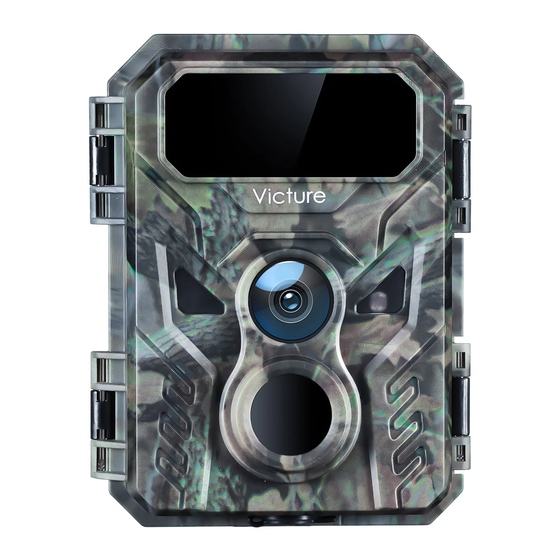
Victure HC 100 Bedienungsanleitung
Verfügbare Sprachen
Verfügbare Sprachen
Inhaltsverzeichnis

Verwandte Anleitungen für Victure HC 100


Inhaltszusammenfassung für Victure HC 100
- Seite 1 User Manual Victure Victure HCl 00 Wildlife Camera...
- Seite 3 Language English 02 - 10 Deutsch 11-19 20 - 28 Franqais taliano Espanol...
- Seite 5 Lifetime professional tech support provided by Victure. Need More Operational Videos? @ Timely customer service via hc.support@govicture.com. @ Search 'Victure TC' on YouTube, enter into the brand page then click the 'PLAYLISTS'to view more operational videos. @ Go through the link on the browser:http://rrd.me/ejNYF...
-
Seite 6: Product Diagram
Product Diagram O LED Infrared Light (6) Video Mic (2) Motion Indicator (7) Locking Bracket (3) Lens (8) Light Sensor SenSOr (9) Locking Bracket... - Seite 7 up,'MENlJ/Video Screen dj Battery Compartment Switch Button DOWN/RepIay/Photo TF card Slot O Speaker Button...
- Seite 8 Tear off the Protective Films before Install Batteries For optimal performance, please use a full set of four Energizer@ or Duracel @rechargeable batteries.
- Seite 9 Insert the TF Card Tips: Our Camera can on y support class 6 or faster TF Card ranging from 4GB to 32GB, please format the TF Card before using.
- Seite 10 Format the TF Card & Reset the Camera QI)Slideswitchbutton to ON mode (2)Longpress A 'to enter MENU FassiNord Serial AUTO VolumePec VolumePIa•,• Back En ter (3) Reformat memory card @ ResetSetting...
- Seite 11 Function Description of the Buttons Switch Button Function 1. n the OFF position, the camera is off 2. n ON position, you can set the parameters in the MENU. If there is no further operation, the camera will countdown after 30 seconds/5 minutes/ 10 minutes (The system default is 30 seconds).
- Seite 12 In Replay Mode 1 Long-press can exit main menu or sub menu settings. 2. Short press can move option up or add value. Start or stop replaying videos. 1. Long-press can exit Replay mode. 2. Short press can browse next photos and videos. In MENU Setting Mode 1.
- Seite 13 A Cautions: If there is any problem or suggestions with the product, please feel free to contact us with email hc.support@govicture.com, and we wou d try our best to offer you a satisfying solution. turn camera 1. Please make sure that you instal the batteries with the correct polarity. 2.
- Seite 14 Garantie Senden Sie uns Ihre Bestellung als Screenshot per E-Mail an hc.support@govicture.com, um die Garantie auf 36 Monate zu verlängern! Lebenslanger professioneller technischer Support von Victure. Benötigen Sie mehr informative Videos? O) Kundenserviceüber hc.support@govicture.com. (2) Sucheauf YouTubenach "VictureTC" gehe auf die Markenseiteund klicke auf "...
- Seite 15 Produkt Übersicht O LED Infrarotlicht 6) Aufnahmeloch @ Rote LED (7) Schließer (3) Linse 6) Licht Sensor (9) Schließer sensor (5) DC Anschluss...
- Seite 16 00 LCD Bildschirm MENU/Shoot 01)Batteriefach (5 Umschalttaste 02 TF Karten Einschub Wiedergabe /Modus 09 '0K' Knopf O Lautsprecher...
- Seite 17 Entfernen Sie die Schutzfilme bevor Sie das Produkt benutzen Für eine optimale Leistung verwenden Sie bitte einen kompletten Satz von vier Energizer@ Oder Duracel @-Akkus.
- Seite 18 Die TF Karte einschieben A Tipps: Unsere Kamera unterstützt nur TF-Karten der Klasse 6 Oder schnel er von 4 GB bis 32 GB, bitte formatieren Sie die TF-Karte vor der Verwendung.
- Seite 19 Formatieren der TF Karte und zurücksetzen der Kamera (2)Lang drücken u m'O'in das (X)SchiebenSie den Schalterknopf in den EIN-Modus. Menü zu gelangen Z'.an.icls Zu•ijck —Enter (3) Formatierender Speicherkarte @ Zurücksetzen der Einstelungen...
-
Seite 20: Funktionsbeschreibung Der Knöpfe
Funktionsbeschreibung der Knöpfe Switch Button Function 1. n der Position OFF ist die Kamera ausgeschaltet. 2. In der Position können Sie die Parameter MENU einstel en. Wenn es keine weitere Bedienung gibt, zählt die Kamera nach 30 Sekunden/5 Minuten/10 Minuten (Standardeinstel ung des Systems ist 30 Sekunden) und wechselt dann in den automatischen Aufnahmemodus. - Seite 21 In Replay Mode 1. Option zum Löschen von Dateien mit anger Druckzeit. Seite Löschen Dateien kann mit angem Druck auf die Wiedergabeseite zurückgekehrt werden. 2. Kurzdruck kann frühere Fotos und Videos durchsuchen. Starten Oder beenden Sie die Wiedergabe von Videos. 1.
- Seite 22 A Vorsichtsmaßnahmen: Wenn Sie keine Lösung für hr Problem finden, kontaktieren Sie uns bitte per E Mail hc.support@govicture.com und wir bemühen uns unser Bestes tun, um hnen eine befriedigende Lösung anzubieten. Wenn die Kamera nicht eingeschaltet werden kann? 1. Bitte stel en Sie sicher, dass Sie die Batterien mit der richtigen Polarität eingelegt haben.
- Seite 23 Besoin de plus de vidéos de démonstration ou d'utilisation en situation réelle? (j) Notre service client vous répond rapidement sur hc.support@govicture.com. (2) Recherchez"Victure TC" sur YouTube,entrez dans a page de Ia marque, puis cliquez sur "PLAYLIST" O Consultez Ie site Web: http://rrd.me/ejNYF @ Scannez directement e code QR ci—dessous.
- Seite 24 La structure du produit (l) Lumiére LED (6) Micro (2) Lumiére rouge (Z)Crochet de verrouilage (3) Lentille (8) Capteur photosensible @ Capteurs (9) Crochet de verrouilage (5) DC-in port...
- Seite 25 0506 (O Écran LCD 04 MENU/Tirer 05 Bouton interrupteur Compartiment pi es 06 Rejouer/Mode Emplacement carte mémoire '0K' bouton O Orateur...
- Seite 26 Retirer les films de protection avant utilisation Installer les Piles Pour des performances optimales, nous vous recommandons d'utiliser un ensemble de 4 piles rechargeables, qui possédent une plus ongue durée de vie que des pi es classiques. Les marques recommandées sont Energizer@ ou Duracel @.
- Seite 27 Insérer la carte mémoire (SD TF) A Conseils: Notre appareil photo ne prend en charge que es cartes TF de classe 6 ou plus rapides, al ant de 4 Go 32 Go. Veuil ez formater a carte TF avant 'utiliser.
- Seite 28 Formater la Carte mémoiredans l'appareil et Redémarrezle (J)Commutateur de diapositive (2)Appuyez onguement sur O' pour a ccéder auMENU e over g) Reformat memory card @ ResetSetting...
- Seite 29 Description de la fonction des boutons Fonction du bouton Bouton 1. En position OFF, a caméra est éteinte. 2. En position ON, vous pouvez définir es paramétres dans Ie MENU. Si aucune autre opération n est effectuée, appareil photo réalise un compte å rebours de30 secondes / 5 minutes / 10 minutes (Ia va eur par défaut du systéme est de 30 secondes).
- Seite 30 En mode de relecture 1. Appuyez onguement sur e boutonpour entrer dans 'option de suppression de fichier. Dans Ia page de suppression de fichier, appuyez onguement pour revenir a page de relecture. 2. Appuyez briévement dessuspour parcourir Ies photos et vidéos précédentes. Démarrer ou arréter Ia lecture...
- Seite 31 Questions-reponses A Précautions: Si vous ne trouvez pas •ci de solution efficace au probléme que vous avez rencontré, n hésitez pas å nous contacter par e mail: hc.support@govic ture.com et nous ferons de notre mieux pour vous offrir une solution satisfaisante.
- Seite 32 36 mesi! Supporto tecnico professionale a vita fornito da Victure. Se Avete Bisogno di Videos Operativi? (J)Contattatei servizioclientitramitehc.support@govicture.com @ CercateVictureTC suYouTube, e ntratenel a paginadel brand e quindi fate clic su 'PLAYLISTS'.
- Seite 33 Struttura del Prodotto (j) LED luce infrarossa Pulsante di registrazione @ LED rosso Aggancio di sicurezza (3) Lenti Sensore luce (9) Aggancio di sicurezza @ Sensore PIR (5) Porta DC...
- Seite 34 to Schermo LCD Menu / Sparare A1oggio batterrie Pulsante selezione scheda Replay / Modalitå Altoparlante Pulsante...
- Seite 35 Rimuovere le Pellicole Protettive Installa le Batterie Per una prestazione ottima e utilizza un set di quattro batterie Energizer o Duracell ricaricabili.
- Seite 36 Inserisci la Scheda La nostra camera pub supportare solo una scheda TF classe 6 0 superiore capacitå da 4GB a 32GB. Formatta Ia scheda TF prima dell utilizzo.
- Seite 37 Formatta la Sxheda TF & Azzara la Camera O Sposta Itinterruttore su ON @ premi a lungo nel MENU hdietro O Formatta Ia sxheda TF Ia camera...
- Seite 38 Descrizione e Funzionanmento dei pulsanti Modo di funzionamento Accensione 1. Nel a posizione di OFF, Ia camera spenta; 2. Nella posizione di ON, possibile settare i paramentri dal MENU. La camera entra nel a modalitå dl scatto automatic se non viene utilizzata per 30 secondi/ 5 minuti/10 minuti (I default...
- Seite 39 Modalitå di REPLAY 1. Lunga pressione per entrare nel a modalitä di cancellazione file. Dalla modalitå di cancellazione, fare una unga pressione per tornare al a pagina di REPLAY 2. Veloce pressione per vedere foto e video acquisiti. Start Stop del a vision dei video. 1.
-
Seite 40: Domande & Risposte
Domande & Risposte A Avvertenze: Per Ogni problema o suggerimento del prodotto, ci puoi contattare iberamente via mail a hc.support@govicture.come faremo del nostro meglio per soddisfarti. La camera si accende? 1. Assicurati Che e pile siano state inserite correttamente rispettando a polarita' 2. - Seite 41 Envianos una captura de pantalla de tu Orden de pedido al correo electrénico hc.support@govicture.com para ampliar a garantia a i36 meses! Victure te ofrece soporte técnico de por Vida. Videotutoriales para rnås informaciön? (i) Serv'icio al clientepuntualen eIcorreoelectr6nico: hc.support@govicture.com. (2)BusqueVictureTC en YouTube, h agaclip en eI enlaceconeI iconode Ia marcay luego haga clic en PLAYLSTS (3) Ira travésdel enlaceen eI navegador: h ttp://rrd.me/ejNYF.
-
Seite 42: Estructura Del Producto
Estructura del producto O Bombillas LED infrarrojas (6)Sujecciön a tripode @ LED rojo (j Cierre estanco (3) Lentes (B)Sensor luminoso @ Sensor Infrarrojo (9) Locking Bracket (5) Puerto de alimentaciön externa... - Seite 43 MENÜ/Disparo Pantalla (lj Compartimento de Ias Pilas Interruptor 02 Ranurapara tarjeta TF Revisar/Modo Boton '0K' O) Altavoz...
- Seite 44 Quite los plåsticos protectores antes de usar Instale las pilas Para un uso 6ptimo, por favor, use un pack de cuatro pilas recargables Energizer@ o Duracel @...
- Seite 45 Inserte la tarjeta TF AConsejos: Nuestra cåmara solo admite tarjetas TF de clase 6 0 superior de entre 4GB y 32GB de capacidad, por favor, formatea a tarjeta TF antes de usarla.
- Seite 46 Formatea la tarjeta TF y reinicia la cåmara (2) M antén presionado (j) Mueve eI interruptor a a para entrar en MENU posici6n 'ON' sensibilitad AUTO Volumen reproccitn @ RestauraeI equipo a as Formatea a tarjeta de opciones de fåbrica memoria...
- Seite 47 Descripci6n de las funciones de los botones Interruptor Funci6n 1. En a posic6n OFF, Ia cåmara estå apagada; 2. En posici6n ON, puedes configurar os paråmet en eI MENU. Una vez realizadas estas operaciones, Ia cåmara comenzarå una cuenta atrås y tras 30 segundos / 5 minutos / 10 minutos (EI valor por defecto es 30 segundos), a cåmara entrarå...
- Seite 48 En modo Revisar 1. Mantener pulsado para abrir a opciön borrar. Con la opci6n borrar abierta, mantener pulsado para volvera a pantal a anterior 2. Pu saciön corta para ver eI video o a foto anterior. niciar o parar a reproducci6n de video 1.
-
Seite 49: Preguntas Y Respuestas
Preguntas y Respuestas A Atenciön: Si no encuetras aqui a soluciön a tu problema, no dudes en contactar con nosotros en eI siguiente correo electrénico: hc.support@govic ture.com y haremos todo o que esté en nuestra mano para solucionar su problema. 040 puedes encender la cåmara? 1. - Seite 50 CDEÄOJicture HC100 Victure "Ä5R—+j Victure Z A: hc.support@govicture.com OYouTube Victure VictureTC7fi http://rrd.me/ejNYF Victure TC nx-LA...
- Seite 51 5 ALED...
- Seite 52 ryou —ccaso 114<4/...
- Seite 53 "411...
- Seite 54 Class FAT32...
- Seite 55 r MEUN High...
- Seite 56 4-16 -Qtoe...
- Seite 57 111B v— 111B...
- Seite 58 < hc.support@govicture.com U C < Energizer@l .5V...
- Seite 60 J L UO!suaA eu!L13 u! epen...
- Seite 61 :89mm*119mm *iTfit...