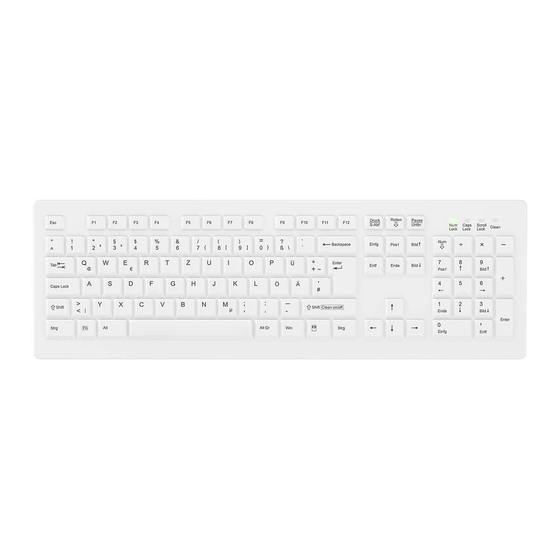
Cherry AK-C8100F-F Serie Gebrauchsanleitung Und Sicherheitshinweise
Verfügbare Sprachen
Verfügbare Sprachen
Quicklinks
Instructions and Safety Information
AK-C8100F-F series
The wireless keyboard AK-C8100F-F is a high quality, highly reliable hygiene keyboard with full desktop
layout. It is particularly designed for the use at hospitals and by practitioners. The keyboard is sealed
with a silicone membrane. The CLEAN function avoids sending keystrokes to your PC during
cleaning/disinfection. Please follow the instructions provided by your authorities for standard
disinfection of surfaces for reprocessing of the keyboard.
Installation:
1) Insert the 4 batteries in the orientation shown on the bottom of the keyboard.
2) Insert the wireless USB-RF-Dongle into the USB port of your computer.
3) The keyboard should now be functional and ready for usage.
Delivery Content:
1x 2.4 GHz wireless keyboard
4x non-rechargeable Batteries AAA (Alkali-Mangan)
1x 2.4 GHz USB-RF-Dongle
1x User Instructions
Safety Note: The enclosed batteries must not be charged!
Manufacturer:
Cherry Digital Health GmbH
Web: www.cherry.de
Cherrystraße 2
Tel: +49 (0) 9643-2061-100
D-91275 Auerbach/OPf.
Legal information:
Hereby Cherry Digital Health GmbH declares that the type of radio equipment used with the product
models K104R-RF (2.4G Wireless Keyboard) and DON002 (Wireless Keyboard Dongle) complies with
the DIRECTIVE 2014/53/EU (RED). The full text of the EU declaration of conformity is available at the
following internet address:
http://www.cherry.de/compliance
As distributor of batteries, we have the following obligations under article 20 of directive 2006/66/EC:
1) Batteries can be returned free of charge after use in shops selling batteries.
2) End users are legally obliged to return used batteries.
3) Manufacturers of batteries are required to mark batteries with the symbol of the crossed-out
wheeled bin before placing them on the market for the first time.
The manufacturer of batteries shall label batteries containing more than 0.0005 % by mass of mercury,
more than 0.002 % by mass of cadmium or more than 0.004 % by mass of lead, before placing them
on the market for the first time with the chemical symbols of metals (Hg, Cd, Pb) in which the limit is
exceeded. The characters are to be applied below the symbol.
Electrical and electronic equipment (EEE) is marked with the symbol of the crossed-out
wheeled bin indicating the requirement not to dispose of waste electrical and electronic
equipment (WEEE) as unsorted municipal waste and to collect such WEEE separately.
Final users of WEEE from private households shall be able to return WEEE as per EU
country local regulations into established collection facilities free of charge. Please
consult your municipal waste department for detailed advice on separate collection of WEEE.
The packaging material used with this product is identified as PAP-20 and LDPE-04. Please follow the
rules of your local community on collection of used packaging.
Frequently Asked Questions (FAQ):
Usage of Medical Protective Gloves!
Nitrile gloves reduce the risk of allergic reactions and help prevent discoloration caused by latex
wear.
USB Maintenance Port!
The Micro-USB interface shall only be used for firmware updates and not for normal operation! The
customer support will guide you in case necessary.
Power save mode!
The status LEDs show the status of NumLock, CapsLock and ScrollLock as soon as those functions
are enabled. The status LEDs will turn off after a while to save battery power. Press the key "Fn" to
check the status of the LEDs.
How to determine the battery status?
The keyboard indicates a battery low situation with the status LEDs. With each key actuation one of
the status LEDs will light up shortly in round robin manner. Please replace the batteries as soon as
possible.
How to activate/deactivate the CLEAN function?
The key combination "Fn" + "Shift (Clean on/off)" activates and deactivates the CLEAN function.
The mode 'CLEAN function active' is indicated with the status LED "Clean". During this mode the
user can wipe disinfect or clean the keyboard and all key entries are suppressed.
The mode 'CLEAN function active' ends automatically after a timeout of 60 seconds or by key
combination.
How to investigate a wireless connection problem?
1) Check whether CLEAN Mode is active and deactivate it if required.
2) Check whether the USB RF Dongle is still recognized in the device manager of your Operating
System (VID&PID=0x0F39&0x000F).
3) Follow the pairing instruction.
4) In case all previous steps did not resolve the problem please consult with customer services.
How to pair a new USB-RF-Dongle with the device?
Note: This procedure is only required in case you received a new USB-RF-Dongle as a spare part in
case the dongle was lost or damaged!
1) Make sure that all other USB-RF-Dongle in the near neighborhood are removed from the USB
ports and connect only the new USB-RF-Dongle.
2) Initiate the pairing between USB-RF-Dongle and Keyboard with key combination "Fn" + "Esc".
3) The Scroll Lock status LED will flash in fast frequency for approx. 5 seconds until the pairing
process completed.
4) Test the keyboard. In case the pairing process failed double check Step 1.
5) In case the pairing process is not successful please consult with customer services.
Specification:
Compatibility
All OS that support USB HID Keyboards.
Temperature Range
Storage -20 to +60 °C / Operation 0 to +50 °C
Chemical Resistance
Wipe Disinfection according to Guidelines Cleaning and
Disinfection DGHM/VAH
Wireless USB-RF-Dongle
USB 2.0 FS Type A connector, wireless range 10 m
Frequency-band
2400 MHz – 2483,5 MHz
Maximum transmission power
10 mW
Supply Voltage / Current
6 V by 4x non-rechargeable Batteries AAA, typical 5 mA
Consumption
Dimensions (incl. rubber cover)
Approx. 449 x 142 x 32 mm
Weight
Approx. 918 g
Agency Approvals / Tests
CE, RoHS, Test Report FCC, EN 60601-1-2:2015*
*No Medical Device acc.to Regulation (EU) 2017/745
All rights reserved. Copy or duplication, except for personal use, not permissible without specific prior written consent by Cherry Digital
Health GmbH. Contents are subject to change without notice. Errors excepted. Copyright by Cherry Digital Health GmbH.
Version 20240627

Verwandte Anleitungen für Cherry AK-C8100F-F Serie


Inhaltszusammenfassung für Cherry AK-C8100F-F Serie
- Seite 1 *No Medical Device acc.to Regulation (EU) 2017/745 All rights reserved. Copy or duplication, except for personal use, not permissible without specific prior written consent by Cherry Digital Health GmbH. Contents are subject to change without notice. Errors excepted. Copyright by Cherry Digital Health GmbH.
- Seite 2 Rechtliche Hinweise: Anschlüssen entfernt werden und verbinden Sie nur den neuen USB-Funk-Dongle. Hiermit erklärt Cherry Digital Health GmbH, dass der Funkanlagentyp in den Produktmodellen K104R- 2) Starten Sie den Pairing-Prozess mit der Tastenkombination “Fn” + “Esc”. RF (2.4GHz Funk-Tastatur) und DON002 (USB-Funk-Dongle) der Funkanlagen-Richtlinie 2014/53/EU 3) Die Scroll-Lock Status LED blinkt in schneller Frequenz für ca.