Blaupunkt KP-R1 Bedienungsanleitung
Funk-bedienteil
Verfügbare Sprachen
Verfügbare Sprachen
Wireless Remote Keypad (KP-R1)
P
a
r
t
s
D
e
s
c
r
i
p
t
i
o
n
P
a
r
t
s
D
e
s
c
r
i
p
t
i
o
n
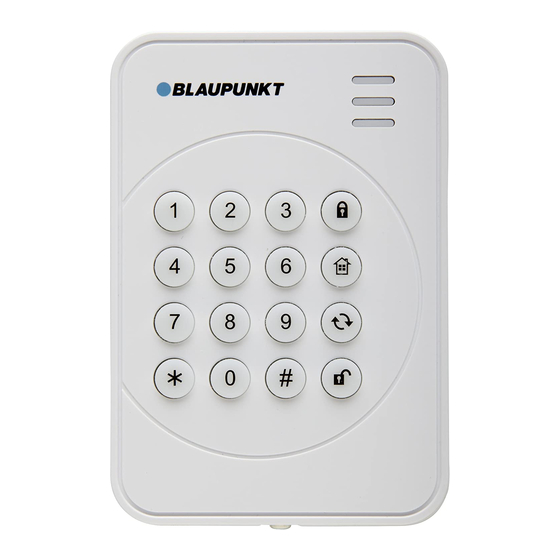
1. Active LED (Blue/Orange)
2. Status LED (Blue/Red)
3. Fault LED (Orange)
4. Away Arm Key
5. Home Arm Switch
6. Status Key
7. Disarm Key
8. Panic Alarm
Press both 1 and 3 key to trigger Panic alarm
9. Fire Alarm
Press both 4 and 6 key to trigger Fire alarm
10. Emergency Alarm
Press both 7 and 9 key to trigger Emergency alarm
11. Battery Insulator
12. Mounting Knockouts
13. Tamper Switch
The Tamper switch protects the PIR from unauthorized cover
opening.
P
a
c
k
a
g
e
C
o
n
t
e
n
t
P
a
c
k
a
g
e
C
o
n
t
e
n
t
1 x Remote Keypad
2 x wall plugs and screws
1 x 3V lithium batteries (pre-installed)
L
e
a
L
e
a
For learning the Remote Keypad:
1. Put the Control Panel into learning mode.
2. Press both # and keys to transmit learn code
3. Refer to Control Manual to complete the learning process.
I
n
s
t
a
I
n
s
t
a
The Remote Keypad has 2 knockouts on the back where plastic
is thinner for wall mounting.
1. Use the two knockouts on the back to mark position on the
wall at chest height. Open the back cover.
2. Drill holes into the wall using the knockouts as template.
r
n
i
n
g
r
n
i
n
g
l
l
a
t
i
o
n
l
l
a
t
i
o
n
3. Fix the keypad base onto the wall with the screw and plugs
provided.
4. Replace the keypad cover onto the base.
Surface Fixing
Knockouts x 2
O
p
e
r
a
O
p
e
r
a
S
S
t
t
a
a
n
n
d
d
b
b
y
y
M
M
o
o
d
d
e
e
The Remote Keypad features a power saving feature. When no
key is pressed for 5 seconds, the Remote Keypad will turn off
automatically to conserve power. When any key is pressed, the
Remote Keypad will wake up and turn on Active LED to indicate it
is now under normal operation
K
K
e
e
y
y
p
p
a
a
d
d
S
S
e
e
t
t
t
t
i
i
n
n
g
g
The Remote Keypad features a Test (programming) mode for you
to customize its setting. Before you start using the Remote
Keypad, you should first finish configuration setting.
The Remote Keypad also feature a Keypad PIN code which is
used to access the Test mode, To enter Test Mode, Enter
"0000"(Default Keypad PIN code) + "*" key, the Active Orange
LED will light up
Under Test Mode, the following functions include:
Key
Function
Transmit learn code (same as pressing
"*" + "7"
both # and keys under normal mode)
Enable dual key Panic Alarm function
"*" + "2"
Enable dual key Fire Alarm function
"*" + "3"
Enable dual key Medical Alarm function
"*" + "4"
Disable all dual key functions
"*" + "5"
Change Keypad PIN Code:
"*" + "6"
t
i
o
n
t
i
o
n
Inhaltsverzeichnis

Verwandte Anleitungen für Blaupunkt KP-R1

Inhaltszusammenfassung für Blaupunkt KP-R1
-
Seite 3: Installation
Funk-Bedienteil (KP-R1) 5. Schließen Sie das Gehäuse und ziehen Sie die Schraube Geräteübersicht wieder fest. 1. Aktivitäts-LED (Blau/Orange) Betrieb 2. Status-LED (Blau/Rot) 3. Fehler-LED (Orange) Standby Modus 4. Abwesend Scharf-Taste Das Funk-Bedienteil hat eine Stromsparfunktion. Wenn 5 5. Anwesend-Scharf Taste Sekunden lang keine Taste gedrückt wird, schaltet sich das... -
Seite 4: Spezifikation
Produktregistrierung “4” + “6” (gleichzeitig drücken) Feueralarm “7” + “9” (gleichzeitig drücken) Notfallalarm Registrieren Sie Ihr Blaupunkt Home Security Produkt – und LEDs sichern Sie sich die damit verbundenen Vorteile jetzt! Füllen Sie Aktivitäts-LED dazu das Formular auf registrierung@blaupunkt-sicherheitssys- Die Aktivitäts-LED leuchtet immer dann auf, wenn eine Taste...