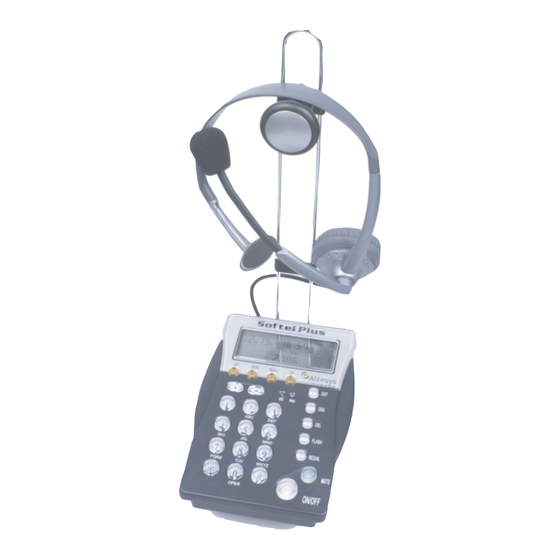
Altesys Softel Plus Bedienungsanleitung
Inhaltsverzeichnis
Softtel Plus + Jazz
1.00
Softtel Plus + Jazz
1.00
BEDIENUNGSANLEITUNG
USER GUIDE
GUIDA ALL'USO
Softel Plus/Jazz Headset
Analoges Telefonendgerät mit Headset
Analogue telephone with headset
Telefono analogico con cuffia telefonica
Ihr Händler:
Importiert von:
Energie- und Kommunikationssysteme GmbH
Lessing Str. 20, 63110 Rodgau, Deutschland
Tel. +49-6106-6600-0 Fax +49-6106-6600-66
E-Mail: info@rocom-gmbh.de
http://www.rocom-gmbh.de
1
32
Kapitel
Inhaltsverzeichnis

Inhaltszusammenfassung für Altesys Softel Plus
- Seite 1 Softtel Plus + Jazz 1.00 Softtel Plus + Jazz 1.00 BEDIENUNGSANLEITUNG USER GUIDE GUIDA ALL'USO Softel Plus/Jazz Headset Analoges Telefonendgerät mit Headset Analogue telephone with headset Telefono analogico con cuffia telefonica Ihr Händler: Importiert von: Energie- und Kommunikationssysteme GmbH Lessing Str. 20, 63110 Rodgau, Deutschland Tel.
-
Seite 2: Inhaltsverzeichnis
Softtel Plus + Jazz 1.00 Softtel Plus + Jazz 1.00 Inhaltsverzeichnis Note personali Beschreibung .................3 Leistungsmerkmale ..............3 Ansicht ...................4 Installation ................5 Programmierungen ..............6 Einstellung von Datum und Uhrzeit ........6 Einstellung der Flashzeit ............6 Einstellung des Displaykontrastes ..........7 Einstellung der Wahlpause .............7 Programmierung der Kurzwahlziele ........7 Bedienungsanleitung .............8 Anruf beantworten ..............8... -
Seite 3: Beschreibung
Cuffia Jazz Das analoge Telefon Softel Plus wurde entwickelt für den Einsatz in professionel- len Call Center und Büros mit hohem Telefonverkehr. Das Softel Plus kann direkt mit einem Altesys Headset betrieben werden. Auf dem grossen Display des Endgerätes ist es möglich die Rufnummer des anrufenden Teilnehmers anzuzeigen (FSK CLIP Funktion). -
Seite 4: Ansicht
Softtel Plus + Jazz 1.00 Softtel Plus + Jazz 1.00 Attesa musicale Ansicht Durante una telefonata, è possibile mettere in attesa l’interlocutore. Per fare ciò è sufficiente premere il tasto HOLD, per riprendere la conversazione ripremere il tasto HOLD. Durante questo intervallo tempo entrambe gli interlocutori RECALL Rufnummerwahltaste VIP Rufnummerschutztaste sentiranno un fondo musicale d’attesa. -
Seite 5: Installation
Softtel Plus + Jazz 1.00 Softtel Plus + Jazz 1.00 Installation Visualizzazione lista chiamate entranti Premendo i tasti freccia è possibile visualizzare e scorrere l’elenco delle ultime Der Installationsort des Gerätes muß: 100 chiamate ricevute. La presenza di una chiamata entrante senza risposta viene segnalata dall'indicazione ottica NEW. -
Seite 6: Programmierungen
Softtel Plus + Jazz 1.00 Softtel Plus + Jazz 1.00 selezionare il valore della pausa desiderata (0,5, 1.0, 1.5 tp 4.0 s). Confermare la 4. Stecken Sie die mitgelieferte Headsethalterung in die hierfür vorgesehenen selezione premendo il tasto STORE. Premere il tasto DEL per uscire Löcher auf der Rückseite des Gerätes. -
Seite 7: Einstellung Des Displaykontrastes
Softtel Plus + Jazz 1.00 Softtel Plus + Jazz 1.00 Taste STORE um die Einstellung zu speichern und zwei Mal die Taste DEL um den Utilizzo con alimentatore esterno Programmiermodus zu verlassen. 1. Collegare l’alimentatore (6V 50mA) alla presa DC 6V. Einstellung des Displaykontrastes 2. -
Seite 8: Bedienungsanleitung
Softtel Plus + Jazz 1.00 Softtel Plus + Jazz 1.00 Installazione Bedienungsanleitung Il psoto dove deve essere installata l'apparecchiatura deve essere: Anruf beantworten - una stanza pulita e asciutta; Ankommende Anrufe werden akustisch und optisch am Telefonendegrät und im - distante da polvere, calore e esposizione diretta alla luce del sole; Headset signalisiert. -
Seite 9: Vista Frontale
Softtel Plus + Jazz 1.00 Softtel Plus + Jazz 1.00 Vista frontale Wahl einer Rufnummer in den Listen Sie können die in den Listen gespeicherten Rufnummern (erhaltene/getätigte Tasto RECALL per la selezione VIP protezione dei numeri Anrufe) anrufen indem Sie während der Anzeige der Rufnummer die Taste REDIAL dei numeri memorizzati nelle memorizzati nelle liste betätigen. -
Seite 10: Headset Jazz
Softtel Plus + Jazz 1.00 Descrizione Headset Jazz Il telefono analogico Softel Plus è stato sviluppato per l'uso in call center e ambienti d'ufficio ad alto traffico telefonico. Softel Plus può essere usato in congiunzione con una cuffia Altesys collegata direttamente all'apparecchio telefonico. -
Seite 11: Notizen
Softtel Plus + Jazz 1.00 Softtel Plus + Jazz 1.00 Indice Notizen Descrizione ................23 Servizi ................... 23 Vista frontale ................ 24 Installazione ................. 25 Programmazione ..............26 Programmazione data e ora ..........26 Programmazione tempo durata flash ........26 Regolazione contrasto display .......... - Seite 12 Softtel Plus + Jazz 1.00 Softtel Plus + Jazz 1.00 Contents Your notes Description ................13 Features ................13 Overview ................14 Installation ................15 Programming ............... 16 Setting date and time ............16 Setting flash recall time ............16 Setting display contrast ............
-
Seite 13: Description
1.00 Description Headset Jazz The analogue telephone Softel Plus was designed for the use within call center application and office enviroments with high telephone traffic. The Softel Plus can be used with a Altesys headset directly connected to it. On the large display of the device the call party telephone number can be visualizied (FSK CLIP function). -
Seite 14: Overview
Softtel Plus + Jazz 1.00 Softtel Plus + Jazz 1.00 Flash recall function Overview If your phone is connected to a telephone switch (PABX) you can use the FLASH key to start a recall inside your system. THe flash detection of the PABX can be RECALL button for the redial of VIP protection for in the list different and has to be programmed. -
Seite 15: Installation
Softtel Plus + Jazz 1.00 Softtel Plus + Jazz 1.00 Installation Deleting numbers from the stored lists The installation place for this device must be: When display shows caller data or dialed call data, press the DEL key to delete the number. -
Seite 16: Programming
Softtel Plus + Jazz 1.00 Softtel Plus + Jazz 1.00 · Press the ON/OFF key; 3. Connect the external line to the socket TEL-LINE using the straight cable. · Press the SET key; 4. Insert the headset stand to the base (the hole it’s on the right side of the ·...