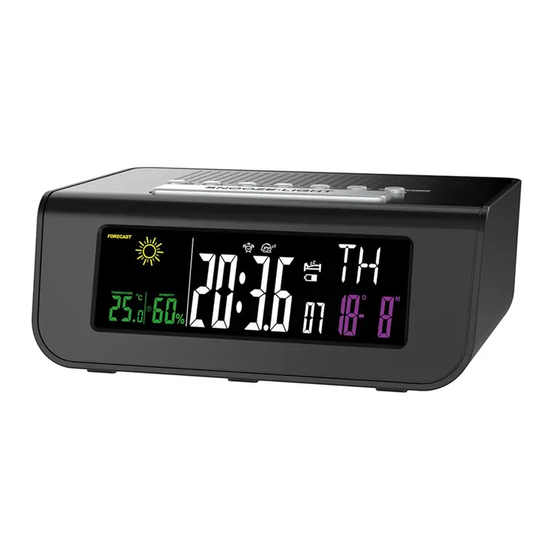
Emate E0206FM Gebrauchsanweisung
Inhaltsverzeichnis
Verfügbare Sprachen
Verfügbare Sprachen
R0206 / E0206FM
RADIO REVEIL "WEATHER STATION"
Avertissement : Veuillez lire ce manuel d'instructions attentivement avant d'utiliser
l'instrument et le conserver pour une utilisation future.
BOUTONS
1. DOWN
2. UP
3. SET
4. MODE
5. VOL-
6. VOL+
7. RADIO ON/OFF
8. SNOOZE·LIGHT
9. BATTERY COVER
1. CARACTERISTIQUES TECHNIQUES
* Radio FM(87.0Mhz-108.0Mhz)
* Affichage négatif
* Affichage de l'heure au format 12h ou 24h
* Alarme avec fonction de rappel d'alarme
* Fonction endormissement
* Rappel batterie faible
* Choix de 7 langues pour l'affichage
* Fonctionne avec piles 3xAA (non incluses) ou sur secteur avec adaptateur 4.5V DC
(inclus)
FR
2. MISE EN MARCHE
Ouvrir le compartiment à piles et insérer 3 piles AA dans le compartiment à piles en
respectant la polarité, ou brancher l'adaptateur secteur fourni avec le radioréveil.
3. REGLAGE DE LA DATE ET DE L'HEURE
Appuyez sur la touche SET au-dessus du radio réveil pendant approximativement
-
2 secondes.
L'affichage de l'heure commence à clignoter. En appuyant sur la touche UP ou
-
DOWN, vous pouvez régler l'heure.
Appuyez sur la touche SET pour confirmer la saisie.
-
L'indicateur des minutes clignote. En appuyant sur la touche UP ou DOWN, vous
-
pouvez régler les minutes.
Appuyez de nouveau sur la touche SET pour confirmer la saisie.
-
Le mode 12/24hr clignote. En appuyant sur la touche UP ou DOWN, vous pouvez
-
choisir l'affichage sur 12h ou sur 24h.
Appuyez de nouveau sur la touche SET pour confirmer la saisie.
-
L'indicateur des années clignote. En appuyant sur la touche UP ou DOWN, vous
-
pouvez régler l'année.
Appuyez de nouveau sur la touche SET pour confirmer la saisie.
-
L'indicateur des mois clignote. En appuyant sur la touche UP ou DOWN, vous
-
pouvez régler le mois.
Appuyez de nouveau sur la touche SET pour confirmer la saisie.
-
L'indicateur des dates clignote. En appuyant sur la touche UP ou DOWN, vous
-
pouvez régler la date souhaitée.
Appuyez de nouveau sur la touche SET pour confirmer la saisie.
-
L'indicateur de la langue clignote. En appuyant sur la touche UP ou DOWN, vous
-
pouvez sélectionner la langue d'affichage.
Country
English
Abbreviation
EN
Sunday
SU
Monday
MO
Tuesday
TU
German
French
Spanish
Italian
Dutch
GE
FR
ES
IT
NE
SO
DI
DO
DO
ZO
MO
LU
LU
LU
MA
DI
MA
MA
MA
DI
Denmark
Russian
DA
RU
SO
BC
MA
ПH
TI
BT
Inhaltsverzeichnis

Inhaltszusammenfassung für Emate E0206FM
-
Seite 5: Einstellung Datum Und Uhrzeit
R0206 / E0206FM Die Stundenanzeige beginnt zu blinken. Mit den Knöpfen UP oder DOWN können 2. INBETRIEBNAHME Sie die Stunde einstellen. Mit SET die Eingabe bestätigen. Die Minuten beginnen zu blinken. Mit den Knöpfen UP oder DOWN können Sie die Minuten einstellen. - Seite 6 R0206 / E0206FM 5. EINSTELLUNG RADIO Temperatur und Feuchtigkeit werden jede Minute aktualisiert. Angezeigter Temperaturbereich von 0℃ bis 50℃ -- Bei niedriger oder höherer Temperatur Mit dem Knopf „RADIO ON/OFF“ das Radio einschalten. erscheint folgende Anzeige auf dem Display: LL.L℃/℉(niedriger) oder HH.H℃/℉(höher).
-
Seite 7: Technische Kenmerken
R0206 / E0206FM werden, es sei denn, sie werden von Personen, die für ihre Sicherheit verantwortlich sind, “WEATHER STATION” WEKKERRADIO überwacht oder haben von ihnen Anweisungen zur Verwendung dieses Geräts erhalten. Kinder sollten nicht ohne Aufsicht bleiben, um sicherzustellen, dass sie nicht mit dem Gerät spielen.