Herunterladen Inhalt Inhalt Diese Seite drucken
Inhaltsverzeichnis
  • Inhaltsverzeichnis
  • NL) Omschrijving Van de Aansluitingen en de Led's
  • NL) Installatie
    • Beveilig Uw Verbinding
  • NL) Hoe Streamt U Bestanden Van Uw Travel Reader Naar Uw Apple/Android Toestel
  • NL) Download Bestanden Naar Uw Apple/Android
  • NL) Upload Foto's en Video's Naar de Travel Reader
  • EN) Interface & LED Indicator Description
  • EN) Installation
    • Secure Your Connection
  • EN) How to Use the Travel Reader Storage Function to Stream Files
  • EN) Download Files to Your Apple/Android
  • EN) Upload Pictures and Movies to the Travel Reader
  • FR) Description de L'interface et des Voyants LED
  • FR) Installation
    • Sécurisez Votre Connexion
  • FR) Comment Utiliser la Fonction de Stockage du Lecteur de Voyage pour Diffuser des Fichiers
  • FR) Télécharger des Fichiers Sur Votre Apple/Android
  • FR) Téléversez des Images et des Films Sur le Lecteur de Voyage
  • ES) Descripción de Indicadores LED E Interfaz
  • ES) Instalación
    • Proteja Su Conexión
  • ES) Cómo Utilizar la Función de Almacenamiento del Lector de Viaje para Transmitir Secuencias de Archivos
  • ES) Descargue Los Archivos a Su Apple/Android
  • ES) Cargar IMágenes y Películas al Lector de Viaje
  • PT) Descrição da Interface E Indicadores LED
    • Instalação
    • Proteja a Sua Ligação
  • PT) Instalação
  • PT) como Utilizar a Função de Armazenamento de Leitor de Viagem para Transmitir Ficheiros
  • PT) Transferir Ficheiros para O Seu Dispositivo Apple/Android
  • PT) Enviar Imagens E Filmes para O Leitor de Viagem
  • IT) Descrizione DI Interfaccia E LED
  • IT) Installazione
    • Proteggere la Connessione
  • IT) Riconnettersi con Il Router da Viaggio Utilizzando la Password
  • IT) Scaricare I File Su Apple/Android
  • IT) Caricare Foto E Film Sul Lettore da Viaggio
  • HU) Interfész És Ledes Kijelzők Leírása
  • HU) Telepítés
    • Tegye Biztonságossá a Kapcsolatát
  • HU) Hogyan Használja Az Utazó Olvasó Tárolót Fájlok Közvetítésére
  • HU) Töltsön le Fájlokat Az Apple/Android Készülékére
  • HU) Töltsön Fel Képeket És Filmeket Az Utazó Olvasóra
  • Frequently Asked Questions and Other Related Information
  • Service and Support
  • Warning and Points of Attention
  • Warranty Conditions
  • Declaration of Conformity
Verfügbare Sprachen
  • DE

Verfügbare Sprachen

  • DEUTSCH, seite 22
EM4620
WiFi Travel Reader Pro
Inhaltsverzeichnis
loading

Inhaltszusammenfassung für Eminent EM4620

  • Seite 3: Introduction

    Congratulations with the purchase of this high-quality Eminent product! This product has undergone extensive testing by Eminent’s technical experts. Should you experience any problems with this product, you are covered by a five-year Eminent warranty. Please keep this manual and the receipt in a safe place.
  • Seite 22: De) Beschreibung Von Schnittstellen & Led-Anzeigen

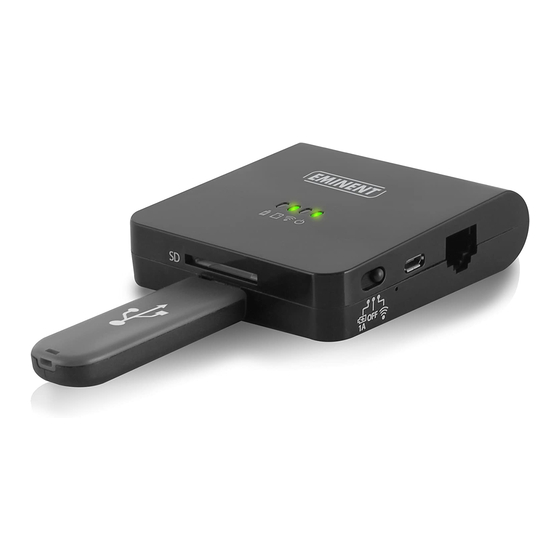
    Schalter (B): Mit dem Schalter können Sie die Funktion für das Gerät auswählen: WiFi-Lesegerät ist aktiviert. Gerät ist ausgeschaltet. USB-Gerät wird aufgeladen (max.1A). Hinweis: Für den Einsatz des EM4620 auf dem iOS-Gerät installieren Sie die „Eminent 4610“-App von Apple Store. Für Android installieren bitte Sie die „Pro Reader“-App von Play Store.
  • Seite 23: De) Installation

    23 | MULTILINGUAL 3.0 (DE) Installation 1. Schließen Sie das Netzwerkkabel am WAN-Port an 2. Verbinden Sie das andere Kabelende mit dem Internetanschluss im Hotelzimmer (oder Router) 3. Wählen Sie das WLAN-Netzwerk Eminent_4620_xxxxxx, stellen Sie eine Verbindung her 4. Nun sind Sie mit dem Internet verbunden 3.1 Ihre Verbindung sichern Wir raten Ihnen dringend, Ihre WLAN-Verbindung zu sichern.
  • Seite 24: De) So Nutzen Sie Die Speicherfunktion Des Mobilen Lesegerätes Zum Übertragen Von Dateien

    24 | MULTILINGUAL 4.0 (DE) So nutzen Sie die Speicherfunktion des mobilen Lesegerätes zum Übertragen von Dateien 1. Stecken Sie einen USB-Stick oder eine SD-Karte in das mobile Lesegerät (nicht beides gleichzeitig) 2. Installieren Sie die App aus dem App Store 3.

Inhaltsverzeichnis