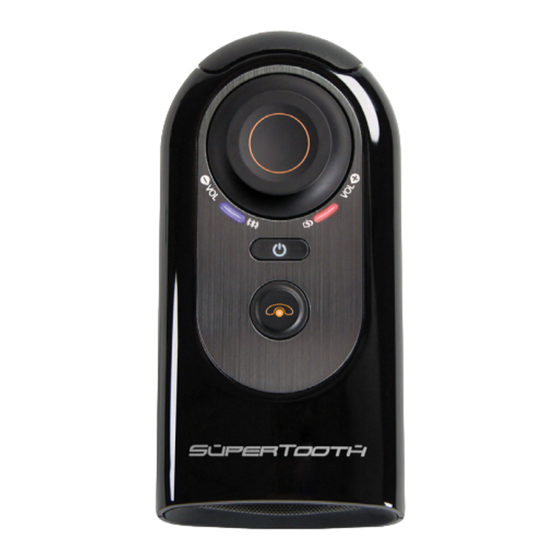
MLINE SUPERTOOTH HD Kurzanleitung
Sprachauswahl und Verbindung mit dem Telefon
Die SuperTooth® HD muss zuerst verbunden werden um alle
Funktionen zu ermöglichen.
1. Erstmalige Verbindung
Drücken Sie die Taste (7) der SuperTooth® HD für 1 Sekunde,
Sie werden dann in das Sprachauswahl Menü geführt.
Anm. : Es stehen 6 Sprachen der SuperTooth® HD, zur
Verfügung: British Englisch, American Englisch, Französisch,
Italienisch, Spanisch und Deutsch.
Sie werden aufgefordert die Lautstärke Taste zu drücken (1)
Die SuperTooth® HD wird Ihnen alle wählbaren Sprachen
vorsagen. Drücken Sie die Lautstärke Taste (1) wenn Ihre
gewünschte Sprache hörbar ist.
Wenn Sie die Deutsche Sprache wählen, wird "Deutsch
gewählt" ausgegeben. Jetzt müssen Sie über Ihr Telefon die
Supertooth® HD über Ihr Bluetooth Menü auswählen. Der Pin
Code ist 0000. Jetzt ist eine Verbindung möglich. Jetzt suchen
Sie über Ihr Bluetooth Menü am Telefon die SuperTooth® HD
und wählen Sie verbinden.
2. Verbinden eines zweiten Telefons:
Schalten Sie die Supertooth® HD ein.
Trennen Sie alle Verbindungen mit bestehenden Telefonen.
Die Supertooth® HD ist nun erkennbar und Paarungsbereit. Sie
können jetzt jedes andere Telefon über das Bluetooth Menü mit der
Supertooth® HD verbinden.
Achtung : Bitte akzeptieren Sie alle Verbindungsanfragen auf Ihrem
Telefon mit der Supertooth® HD. Der Verbindungscode ist 0000 (vier
Mal die Null).
3. Automatische Telefonbuchübertragung
Nach dem erfolgreichen Verbinden hören Sie: "Verbindung
zum Telefon wurde hergestellt. Das Telefonbuch wird
geladen. Bitte warten." Akzeptieren Sie alle
Verbindungsanfragen am Telefon. Die Freisprecheinrichtung
lädt nun alle Kontakte in den Speicher. Jeder Kontakt wir bei
der Übertragung angesagt.
Achtung : Akzeptieren Sie alle Anfragen (Verbindung...? ,
Internetzugang akzeptieren...?, DUN...?) auf Ihrem Telefon.
Bei Android Telefonen, wird die Anfrage in der oberen
Statusleiste angezeigt.
4. Sprachsteuerung
Wenn Sie einen Anruf bekommen, wird die Supertooth® HD
den gespeicherten Kontaktnamen des Anrufers ansagen.
Nach dem Signalton können sie durch "OK" sagen das
Gespräch entgegennehmen.
Installation
Platzieren sie den Metallclip der SuperTooth® HD an der
Sonnenblende. Verbinden Sie den metallischen Teil der
Supertooth® HD mit dem Metallclip. Die Supertooth® HD sollte
so montiert werden, dass das Mikrofon zu Ihrem Gesicht zeigt.
Metallclip
Sonnenblende
Den Download der Bedienungsanleitung
in der Vollversion nden Sie auf
www.supertooth.net.
Correct Disposal of This Product
(Waste Electrical & Electronic Equipment)
(Applicable in the European Union and other European countries with separate collection
systems). This marking shown on the product or its literature, indicates that it should not be
disposed with other household wastes at the end of its working life. To prevent possible harm to the
environment or human health from uncontrolled waste disposal, please separate this from other
types of wastes and recycle it responsibly to promote the sustainable reuse of material resources.
Household users should contact either the retailer where they purchased this product, or their
local government o ce, for details of where and how they can take this item for environmentally
safe recycling.
Business users should contact their supplier and check the terms and conditions of the purchase
contract. This product should not be mixed with other commercial wastes for disposal.
This product has an embedded, non-replaceable battery, do not attempt to open the product or
remove the battery as this may cause injury and damage the product. Please contact the local
recycling facility for removal of the battery. The embedded, non-replaceable battery is designed
to last the life time of the product.
Hereby, EURO COMMUNICATION EQUIPEMENTS, represented by Xavier MARCHANT, CEO,
declares that the SuperTooth® HD MODEL BTHD, is in compliance with the essential requirements
and other relevant provisions of Directive 1999/5/EC of the European Parliament and of the
Council of 9 March 1999 on radio equipment and telecommunications terminal equipment and
the mutual recognition of their conformity.
For the whole declaration please visit :
http://www.supertooth.net/download
Euro Communication Equipements SAS
Route de Foix D117
11500 NEBIAS (FRANCE)
Federal Communications Commission (FCC) Statement
Industry Canada (IC) Statement
15.21
You are cautioned that changes or modi cations not expressly approved by the part responsible
for compliance could void the user's authority to operate the equipment.
15.105(b)
This equipment has been tested and found to comply with the limits for a Class B digital device,
pursuant to part 15 of the FCC rules. These limits are designed to provide reasonable protection
against harmful interference in a residential installation. This equipment generates, uses and can
radiate radio frequency energy and, if not installed and used in accordance with the instructions,
may cause harmful interference to radio communications. However, there is no guarantee that
interference will not occur in a particular installation. If this equipment does cause harmful
interference to radio or television reception, which can be determined by turning the equipment
o and on, the user is encouraged to try to correct the interference by one or more of the following
measures :
-Reorient or relocate the receiving antenna.
-Increase the separation between the equipment and receiver.
-Connect the equipment into an outlet on a circuit di erent from that to which the receiver is
connected.
-Consult the dealer or an experienced radio/TV technician for help.
Operation is subject to the following two conditions :
1)This device may not cause interference and
2)This device must accept any interference, including interference that may cause undesired
operation of the device.
FCC RF Radiation Exposure Statement :
This equipment complies with FCC radiation exposure limits set forth for an uncontrolled
environment. End users must follow the speci c operating instructions for satisfying RF exposure
compliance. This transmitter must not be co-located or operating in conjunction with any other
antenna or transmitter.
Quick start guide
Die Supertooth® HD ist eine Bluetooth Freisprecheinrichtung
mit Text to Speech und Sprachannahme Funktion. Sie
nennt den Anrufer Namen und synchronisiert das
Telefonbuch Ihres Handy automatisch. Sie können per
Sprachansage Gespräche annehmen. Musik kann mit A2DP
übertragen werden (genauso wie gesprächsgeführte
Navigation). Supertooth® HD unterstützt Multipoint und
DSP (für Geräusch und Echo Unterdrückung) Erleben Sie
einfache Bedienung und tolle Gesprächsqualität.
Bitte beachten: Fahren Sie sicher und im Rahmen des
Gesetzes. Prüfen Sie, ob auf nationaler oder lokaler
Gesetzgebung in Ihrem Land die Nutzung von Mobiltele-
fonen während der Fahrt gestattet ist.

Verwandte Anleitungen für MLINE SUPERTOOTH HD


Inhaltszusammenfassung für MLINE SUPERTOOTH HD
- Seite 1 Sprachauswahl und Verbindung mit dem Telefon 3. Automatische Telefonbuchübertragung Den Download der Bedienungsanleitung Quick start guide in der Vollversion nden Sie auf Nach dem erfolgreichen Verbinden hören Sie: “Verbindung Die SuperTooth® HD muss zuerst verbunden werden um alle www.supertooth.net. zum Telefon wurde hergestellt. Das Telefonbuch wird Funktionen zu ermöglichen.
- Seite 2 Speci cations Bluetooth Standard : Bluetooth Version 3.0 Mikrofon Lautstärkeregel Knopf : Unterstütze Bluetooth-Pro le : A2DP 1. Drehen sie nach rechts um die Lautstärke zu erhöhen, Verbindungsreichweite : Bis zu 10 m nach links um sie zu verringern.. Frequenz : 2.4 GHz 2.