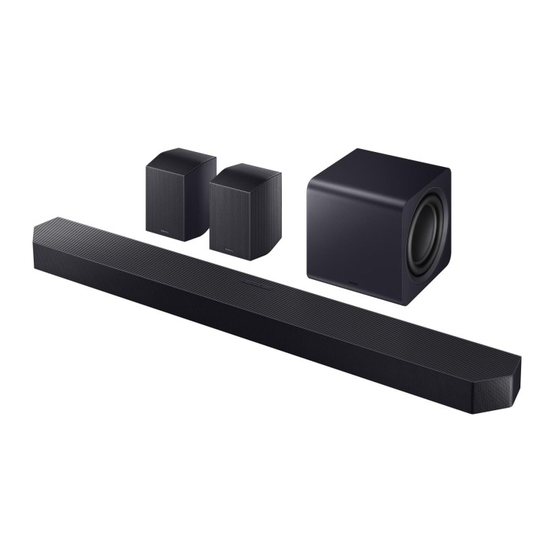
Samsung HW-Q995GF Einfaches Handbuch
Inhaltsverzeichnis
Verfügbare Sprachen
Verfügbare Sprachen
Simple User Guide
HW-Q995GF
You can access the User guide on Samsung's on-line customer support center
by scanning the QR code on the left. To see the manual on your PC or mobile
device, download the manual in document format from Samsung's website.
(http://www.samsung.com/support)
AH85-01094P-01
NSPBI01591H-01
•
Figures and illustrations in this Simpe User Guide are provided for reference only and may
differ from actual product appearance.
•
An administration fee may be charged if either:
(a) an engineer is called out at your request and there is no defect with the product (i.e.
where the user manual has not been read).
(b) you bring the unit to a repair centre and there is no defect with the product (i.e. where
the user manual has not been read).
•
You will be informed of the administration fee amount before a technician visits.
Inhaltsverzeichnis

Verwandte Anleitungen für Samsung HW-Q995GF


Inhaltszusammenfassung für Samsung HW-Q995GF
- Seite 1 • Figures and illustrations in this Simpe User Guide are provided for reference only and may You can access the User guide on Samsung’s on-line customer support center differ from actual product appearance. by scanning the QR code on the left. To see the manual on your PC or mobile •...
-
Seite 2: Checking The Components
• Rubber-Foot x 4 • HDMI Cable Note To purchase additional components or optional cables, contact a Samsung Service Center or Samsung Customer Care. Display (Multi) Button In Standby mode, you can turn on the soundbar by pressing the (Multi) button. -
Seite 3: Bottom Side
Connect the power cable to this power port. Bottom side of soundbar Note Adjust the surround speakers to position them effectively for optimal surround sound. For more information, please refer to the User Guide on the Samsung Electronics website. English – 3... - Seite 4 Connecting to the SmartThings App Connecting to TV 1 Installing App 5-1 Connecting to a TV with Cables • You can control the soundbar and adjust settings using the SmartThings app. Connecting an HDMI Cable • Download the SmartThings app from your mobile device's app store (App Store, Play Store, Galaxy Store) or scan the provided QR code.
- Seite 5 Samsung TVs released in 2017 or later: ( ) → Sound → Sound Output → Soundbar (Wi-Fi) If you connect the soundbar to a Samsung TV that supports Q-Symphony, sound will play from Note both the soundbar and TV at the same time. You can enjoy a richer, more immersive sound with the TV's surround sound.
- Seite 6 Using the Soundbar Remote Control You can adjust the subwoofer (bass) levels by pushing the button up or down. You can adjust the volume levels of each speaker. Press the Up or Down buttons to • The layout, buttons, and functions of the remote control may vary depending on the model. configure the channel you want to adjust.
-
Seite 7: Installing The Soundbar
Standard screw: 6.35 mm ø, 1.27 mm pitch / Length: 18 mm / Quantity: 1 for the left • Connect all cables from external devices before mounting the soundbar on the wall. speaker, 1 for the right speaker • Samsung Electronics doesn't sell wall mounts. English – 7... - Seite 8 TV. Select the soundbar as the ID SET – The menu path may vary depending sound output for the TV. (Samsung 3. Make sure the LINK LED indicator turns on the model. TV: Home ( ) → Menu ( ) →...
- Seite 9 Audio may stutter if the soundbar is your TV or source device. Refer to your TV placed near an electronic device or or device manual for more details. Model name: HW-Q995GF Operating Operating humidity appliance that causes radio interference. •...
-
Seite 10: Correct Disposal Of This Product
Correct Disposal of This [Correct disposal of batteries Note Product in this product] • Samsung Electronics Co., Ltd reserves the (Waste Electrical & Electronic right to change the specifications without Equipment) notice. • Weight and dimensions are approximate. (Applicable in countries with separate (Applicable in countries with separate •... -
Seite 11: Safety Information
Refer to the table below for an explanation your house complies with the power 5. The battery used with this product of symbols which may be on your Samsung WARNING requirements listed on the identification contains chemicals that are harmful to product. -
Seite 12: Produktübersicht
Sie können im Online-Kundensupportcenter von Samsung auf das Produktübersicht Benutzerhandbuch zugreifen, indem Sie den QR-Code auf der linken Seite scannen. Wenn Sie das Handbuch auf Ihrem PC oder Mobilgerät anzeigen möchten, laden Sie es im Dokumentformat von der Samsung-Website herunter: Oberseite http://www.samsung.com/support... -
Seite 13: Unterseite
HDMI TO TV (eARC/ARC) (STROM) HDMI-Anschluss zur Verbindung mit einem Stromanschluss zur Verbindung mit dem TV-Gerät. Netzkabel. Unterseite der Soundbar Hinweis Positionieren Sie die Surround-Lautsprecher für optimalen Surround-Sound. Weitere Informationen finden Sie im Benutzerhandbuch auf der Website von Samsung Electronics. Deutsch – 2... -
Seite 14: Verbinden Mit Der Smartthings-App
Verbinden mit der SmartThings-App Verbinden mit einem TV-Gerät 1 Installieren der App 5-1 Verbinden mit einem TV-Gerät per Kabel • Sie können die Soundbar mit der SmartThings-App steuern und die Einstellungen anpassen. Verbindung über ein HDMI-Kabel • Laden Sie die SmartThings-App aus dem App Store Ihres Mobilgeräts (App Store, Play Store, Galaxy Store) herunter oder scannen Sie den bereitgestellten QR-Code. -
Seite 15: Verbinden Mit Einem Tv-Gerät Über Wlan
Samsung-TV-Geräte ab 2017: ( ) → Ton → Tonausgang → Soundbar (WLAN) Wenn Sie die Soundbar mit einem Samsung-TV-Gerät verbinden, das Q-Symphony unterstützt, wird der Hinweis Ton gleichzeitig von der Soundbar und vom TV-Gerät ausgegeben. Mit dem Surround-Sound des TV- Geräts genießen Sie einen satteren, intensiveren Klang. -
Seite 16: Verwenden Der Soundbar-Fernbedienung
Verwenden der Soundbar-Fernbedienung Sie können die Subwoofer-Stufe (Bass) anpassen, indem Sie die Nach-oben-Taste oder die Nach-unten-Taste drücken. • Layout, Tasten und Funktionen der Fernbedienung können sich je nach Modell unterscheiden. Sie können die Lautstärke jedes Lautsprechers anpassen. Drücken Sie die Nach-oben-Taste oder die Nach-unten-Taste, um den Kanal zu konfigurieren, den Sie anpassen möchten. -
Seite 17: Installieren Der Soundbar
• Schalten Sie die Soundbar aus und ziehen Sie den Netzstecker, bevor Sie die Soundbar an der Wand • Samsung Electronics verkauft keine Wandhalterungen. montieren. Andernfalls besteht die Gefahr eines Stromschlags. • Schließen Sie alle Kabel von externen Geräten an, bevor Sie die Soundbar an der Wand montieren. - Seite 18 Anzeige. 1. Halten Sie ID SET auf der Rückseite des TV-Gerät aktiviert. Aktivieren Sie CEC im Subwoofers und der Surround-Lautsprecher TV-Menü. (Samsung-TV-Gerät: Home ( Wenn kein Ton zu hören ist mindestens 5 Sekunden lang gedrückt. → Menü ( ) →...
-
Seite 19: Technische Daten Und Informationen
• Wenn die Soundbar in der Nähe eines • Möglicherweise müssen Sie die elektronischen Geräts aufgestellt wird, Einstellungen an Ihrem TV- oder Quellgerät Modellname: HW-Q995GF Betriebstemperatur Betriebsfeuchtigkeits das Funkstörungen verursacht, kann anpassen. Weitere Informationen finden Sie bereich bereich es zu Tonstörungen kommen. (z. B. -
Seite 20: Korrekte Entsorgung Von Altgeräten
Hinweis [Korrekte Entsorgung der Korrekte Entsorgung von • Samsung Electronics Co., Ltd behält sich das Batterien dieses Produkts] Altgeräten Recht vor, Spezifikationen ohne vorherigen Hinweis zu ändern. (Elektroschrott) • Gewicht und Abmessungen sind Annäherungswerte. (Gilt für Länder mit Abfalltrennsystemen) (Gilt für Länder mit Abfalltrennsystemen) •... -
Seite 21: Sicherheitshinweise
Ihrem Gleichspannung. kann sich Kondenswasser bilden. Wenn gezogen werden. Der Stecker muss daher Samsung-Produkt befinden. Sie das Gerät im Winter transportieren, Vorsicht. Gebrauchsanweisung jederzeit ohne Weiteres zugänglich sein. warten Sie etwa 2 Stunden, bis das Gerät... -
Seite 22: Vue D'ensemble Du Produit
Vous pouvez accéder au Guide d’utilisation dans le centre d’assistance client Vue d’ensemble du produit en ligne de Samsung en scannant le code QR sur la gauche. Pour accéder au manuel sur votre PC ou votre appareil mobile, téléchargez le manuel au format numérique depuis le site Web de Samsung. -
Seite 23: Face Inférieure
Connectez le câble d’alimentation à ce connecter à un téléviseur. port d’alimentation. Face inférieure de la Soundbar Remarque Positionnez les enceintes surround pour obtenir son surround optimal. Pour plus d’informations, consultez le Guide de l’utilisateur sur le site Web de Samsung Electronics. Français – 2... -
Seite 24: Connexion À Un Téléviseur
Connexion à l’application SmartThings Connexion à un téléviseur 1 Installation de l’application 5-1 Connexion à un téléviseur avec des câbles • Vous pouvez contrôler la Soundbar et régler les paramètres à l’aide de l’application SmartThings. Connexion du câble HDMI • Téléchargez l’application SmartThings depuis l’... -
Seite 25: Connexion Bluetooth
TV Samsung sorties en 2017 ou ultérieurement : ( ) → Son → Sortie son → Soundbar (Wi-Fi) Si vous connectez la Soundbar à un téléviseur Samsung prenant en charge Q-Symphony, le son Remarque sera diffusé simultanément par la Soundbar et le téléviseur. Vous pouvez profiter d'un son plus riche et plus immersif grâce au son surround du téléviseur. - Seite 26 Utilisation de la télécommande de la Soundbar Vous pouvez régler le niveau du caisson de basse (graves) en faisant glisser le bouton vers le haut ou vers le bas. • La disposition, les boutons et les fonctions de la télécommande peuvent varier selon le Appuyez pour régler le volume de chaque enceinte.
-
Seite 27: Installation De La Soundbar Sur Le Socle Du Téléviseur
Coupez l’alimentation et débranchez la Soundbar avant de la fixer au mur. Le non-respect de gauche, 1 pour l’enceinte droite cette consigne peut entraîner un choc électrique. • Samsung Electronics ne vend pas de supports muraux. • Branchez les câbles des appareils externes avant de fixer la Soundbar sur le mur. Français – 6... - Seite 28 Supprimez l’enceinte de la liste des enceintes surround. rapide en bleu » certain temps. Activez l'alimentation. haut-parleurs Bluetooth de l’appareil, Face arrière des puis reconnectez-la. (TV Samsung : enceintes surround La télécommande ne fonctionne pas Accueil ( ) → Menu ( ) →...
- Seite 29 Le son peut être saccadé si la Soundbar • Vous devrez peut-être ajuster les est placée à proximité d'un appareil paramètres de votre téléviseur ou Nom du HW-Q995GF Plage de température Plage d’humidité de électronique ou d'un appareil provoquant de votre appareil source. Pour plus modèle :...
- Seite 30 Remarque Les bons gestes de mise au [Elimination des batteries de Pour obtenir des informations sur • Samsung Electronics Co., Ltd se réserve rebut de ce produit ce produit] les engagements environnementaux le droit de modifier les caractéristiques de Samsung et sur les obligations (Déchets d’équipements...
-
Seite 31: Informations De Sécurité
CA si l’unité présente un Attention. Consulter le mode vases. sur votre produit Samsung. dysfonctionnement. Le produit n’a pas été d’emploi : ce symbole avertit • Pour mettre l’appareil complètement conçu pour une utilisation industrielle,... -
Seite 32: Panoramica Del Prodotto
È possibile accedere alla Guida dell'utente nel centro assistenza clienti online Panoramica del prodotto di Samsung eseguendo la scansione del codice QR qui a sinistra. Per vedere il manuale nel proprio PC o dispositivo mobile, scaricarlo in formato documento dal sito Web Samsung. -
Seite 33: Lato Inferiore
TV. questa porta di alimentazione. Lato inferiore della soundbar Nota Regolare gli altoparlanti surround nella posizione più adatta per ottenere un suono surround ottimale. Per ulteriori informazioni, consultare la Guida dell'utente sul sito Web di Samsung Electronics. Italiano – 2... -
Seite 34: Collegamento Alla Tv
Collegamento all'app SmartThings Collegamento alla TV 1 Installazione dell'app 5-1 Collegamento a una TV tramite cavi • È possibile controllare la soundbar e regolare le impostazioni tramite l'app SmartThings. Collegamento tramite cavo HDMI • Scaricare l'app SmartThings dall'app store del dispositivo mobile (App Store, Play Store, Galaxy Store) o scansionare il codice QR fornito. -
Seite 35: Connessione Tramite Bluetooth
TV Samsung rilasciate nel 2017 o successivamente: ( ) → Audio → Uscita audio → Soundbar Se si collega la soundbar a una TV Samsung che supporta Q-Symphony, l'audio verrà riprodotto (Wi-Fi) contemporaneamente sulla soundbar e sulla TV. L'audio surround della TV offre un'esperienza di Nota ascolto più... - Seite 36 Utilizzo del telecomando della Soundbar È possibile regolare i livelli del subwoofer (bassi) premendo il pulsante su o giù. È possibile regolare i livelli di volume di ciascun altoparlante. Premere i pulsanti Su o • Il layout, i pulsanti e le funzioni del telecomando possono variare a seconda del modello. Giù...
-
Seite 37: Installazione Della Soundbar
• Spegnere e disconnettere la soundbar prima di montarla sulla parete. La mancata • Samsung Electronics non vende supporti a parete. osservanza di tale indicazione potrebbe provocare scosse elettriche. • Prima di installare la soundbar sulla parete, collegare tutti i cavi dei dispositivi esterni. -
Seite 38: Risoluzione Dei Problemi
TV. Selezionare la soundbar come uscita LED LINK smette di lampeggiare e 5 secondi "L'indicatore alla soundbar, passare a BT PAIRING. audio per la TV. (TV Samsung: Home ( Lato posteriore diventa blu fisso. Premere il pulsante di connessione → Menu ( ) →... -
Seite 39: Specifiche E Informazioni
L'audio potrebbe andare a scatti se la impostazioni della TV o del dispositivo soundbar viene posizionata accanto sorgente. Per ulteriori dettagli, Nome del HW-Q995GF Intervallo di Intervallo di umidità a un dispositivo elettronico o un consultare il manuale della TV o del... -
Seite 40: Corretto Smaltimento Del Prodotto
Nota [Corretto smaltimento delle Corretto smaltimento del Gli utenti domestici possono consegnare • Samsung Electronics Co., Ltd si riserva il batterie del prodotto] gratuitamente l’apparecchiatura che prodotto diritto di modificare le specifiche senza desiderano smaltire al rivenditore, al preavviso. (rifiuti elettrici ed elettronici) momento dell’acquisto di una nuova... -
Seite 41: Informazioni Sulla Sicurezza
è necessario scollegare simbolo è di tipo CC. all'utilizzo industriale. È esclusivamente Samsung, fare riferimento alla tabella la spina di alimentazione dalla presa riservato all'utilizzo personale. Se il riportata di seguito. Attenzione. Consultare le di corrente. - Seite 42 Questa pagina è stata lasciata intenzionalmente vuota.
- Seite 43 Questa pagina è stata lasciata intenzionalmente vuota.
- Seite 44 Contact Samsung World Wide If you have any questions or comments relating to Samsung products, please contact the Samsung customer care Centre. Country/Region Samsung Service Center Web Site Country/Region Samsung Service Center Web Site CROATIA 072 726 786 www.samsung.com/hr/support 0333 000 0333 www.samsung.com/uk/support...