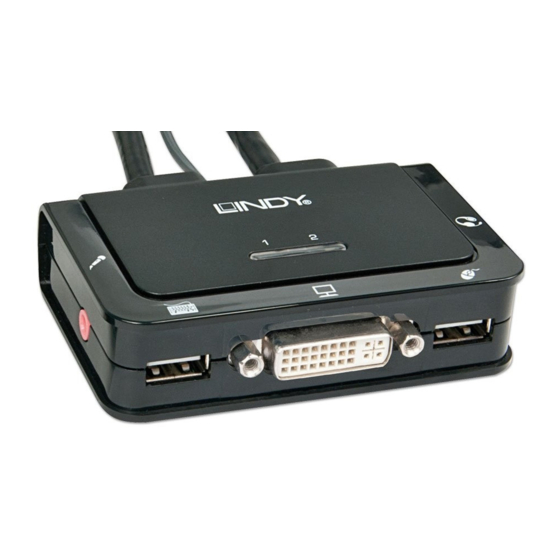
Lindy 42341 Installationsanleitung
Kvm switch compact usb 2.0 audio
Vorschau ausblenden
Andere Handbücher für 42341:
- Benutzerhandbuch (12 Seiten) ,
- Benutzerhandbuch (16 Seiten)
Quicklinks
KVM Switch Compact USB 2.0 Audio
Installation Guide
Installationsanleitung
Manuel Utilisateur
Manuale d'uso
No. 42340
No. 42341
No. 42342
No. 42343
www.LINDY.com
For Home and Office Use
Tested to Comply with
FCC Standards
© LINDY – 2nd EDITION (September 2013)
Specification
•
USB 2.0 compliant, supports USB 2.0 hubs and device sharing
•
Port switching via button, software and keyboard hotkey switching
•
2 System Cables connected to the switch
No. 42340 – Interfaces: HDMI, USB 2.0, Audio out & Microphone
HDMI up to 1920x1080, HDCP & 3D compliant, with HDMI Audio
No. 42341 – Interfaces: DVI, USB 2.0, Audio out & Microphone
DVI-D Single Link: up to 1920x1200, HDCP compliant – not for connec-
tion to HDMI ports of graphic cards or PC/notebook, HDMI and Deep
Colour are not supported!
No. 42342 – Interfaces: VGA, USB 2.0, Audio out & Microphone
No. 42343 – Interfaces: DisplayPort, USB 2.0, Audio out & Microphone
Installation
1.
Install the software (CD) on a PC "Software Installation for Windows".
To install on Mac OS, copy the file (*.pkg format) to the local hard
disk and install it from there.
2.
This will install the software on your computer and create some new
icons in the Windows taskbar or in the Mac Dock. They will look like
one of the icons shown below.
3.
No live connection or KVM switch detected
Port 1computer is displayed and selected
Port 2 computer is displayed and selected
4.
Connect your keyboard, mouse, monitor and audio devices to the
KVM switch.
5.
If required, you may use a USB hub to connect more than 2 USB
devices, to do this please use a self powered USB hub.
6.
Connect the system cables directly to your computers. Extension or
adapter cables may NOT be supported at high video resolutions.
English
Deutsch
Français
Italiano
–
HDMI
–
DVI-D
–
VGA
– DisplayPort
E n g l i s h
E n g l i s h
Operation & Port Switching
There are three methods to toggle between the computers. After switching
please allow the computer a few seconds to load all USB drivers before
you can use the system.
1. Switch Button
The Switch Button is a wired remote control. Press the button to toggle
between the two computers.
2. KVM Switching Software (Windows & Mac OS)
For KVM Switching Software please refer to installation section.
Right clicking the icon opens the port switching menu.
Double clicking the icon opens the configuration menu. Using this
menu you may bind the audio ports to one computer and you may en-
able the beeper.
Windows OS
Switching Menu
Configuration Menu
3. Keyboard Hotkey Switching (Windows & Mac OS)
Each keystroke hotkey sequence must be pressed within two seconds.
It is not possible to switch to a port with no active computer attached.
For Windows, the following key sequence for switching is preset:
"Scroll Lock + Scroll Lock". Additional hotkeys like "CTRL ALT + *" can
be configured via the Configuration menu as described above.
For Mac, please define the hotkeys via the Configuration menu as de-
scribed above.
E n g l i s h
Mac OS
Switching Menu Configuration Menu

Verwandte Anleitungen für Lindy 42341


Inhaltszusammenfassung für Lindy 42341
- Seite 1 HDMI up to 1920x1080, HDCP & 3D compliant, with HDMI Audio between the two computers. No. 42341 – Interfaces: DVI, USB 2.0, Audio out & Microphone 2. KVM Switching Software (Windows & Mac OS) DVI-D Single Link: up to 1920x1200, HDCP compliant – not for connec- For KVM Switching Software please refer to installation section.
- Seite 2 HDMI bis 1920x1080, HDCP und 3D kompatibel, mit HDMI Audio Der Umschaltknopf ist eine kabelgebundene Fernbedienung. Mit ei- No. 42341 – Interfaces: DVI, USB 2.0(2x), Audio, Mikrofon. nem einfachen Betätigen des Knopfes, schaltet der Switch um. DVI-D Single Link, unterstützt Auflösungen bis 1920x1200 und HDCP –...
- Seite 3 (Nur für Deutschland) En 2006, l'union Européenne a introduit la nouvelle réglementation (DEEE) pour le recyclage de LINDY gewährt Endkunden für dieses Produkt zusätzlich und über die gesetzliche Regelung in tout équipement électrique et électronique. Deutschland hinaus eine zweijährige Herstellergarantie ab Kaufdatum. Die detaillierten Bedingun- Chaque Etat membre de l' Union Européenne a mis en application la nouvelle réglementation...